
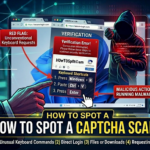
The FTC is reporting a new phishing scam that looks a lot like the CAPTCHA requests you might be used to seeing. Real CAPTCHAs give you image- or text-based tasks to prove you’re not a robot — something like typing letters and numbers exactly as they appear, or matching pictures of things like fire hydrants or traffic lights. Here’s how the fake CAPTCHA requests happen…and how you could wind up installing malware on your own device. You get an unexpected CAPTCHA request while browsing a … [Read more...]
June 8, 2026 By Computer Techs
May 30, 2026 By Computer Techs
How to shut down your computer – you may be doing it wrong
Do you think pressing the power button on your computer is the proper method to shut down or turn it off? That's fine if you can't otherwise shut it off. But in normal circumstances, use the correct method shown in the video below. If you can't shut down your computer the normal way If you get a popup on your computer that's telling you to call a phone number to fix a sudden problem with your computer - it's a scam. If you can't close the scary webpage and/or if it's telling you to not … [Read more...]
May 28, 2026 By Computer Techs
The surprising things we’ve discovered with our cybersecurity checkups for individuals

In today's digital age, our personal information is more valuable than ever. From online banking to social media, we're constantly sharing sensitive data that could be a target for cybercriminals. That's why cybersecurity checkups have become increasingly important. These assessments can reveal vulnerabilities in our online presence that we may not even be aware of. Here are some surprising things we've discovered through cybersecurity checkups for individuals: 1. Weak or Reused … [Read more...]
May 26, 2026 By Computer Techs
Why we typically don’t recommend paying for data removal or identity theft protection services
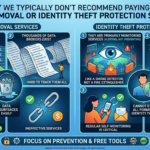
Subscription limits and structural barriers: Data removal services cannot completely delete your information from the internet due to insurmountable legal and structural barriers, such as criminal-run dark web marketplaces that ignore deletion requests and government public records (like property deeds and court records) that are exempt from privacy laws. The "Whack-a-Mole" subscription trap: Automated removal tools face resistance from data brokers requiring manual identity … [Read more...]
May 7, 2026 By Computer Techs
Yes, we can help you with your smartphone too
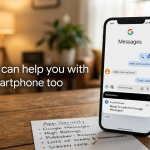
Most of us think of our smartphones as just another tool in the pocket, but they’ve quickly become the most important piece of technology we own. From managing finances to staying connected with family, your phone is a powerhouse. That’s why we want to make sure yours is running smoothly, securely, and up to date with the latest changes in the mobile world. The Big Switch: Saying Goodbye to Samsung Messages If you use a Samsung smartphone, you might notice some changes coming to messaging. … [Read more...]
April 23, 2026 By Computer Techs
Why YOU are the best protection against computer viruses

In the early days of computing, the primary digital threat was the "computer virus"—malicious code designed to disrupt your system or delete files. Today, however, the digital landscape has shifted dramatically. While traditional viruses still exist, modern threats have evolved into sophisticated phishing and social engineering scams that target the user rather than the software. Because these scams rely on human psychology rather than technical exploits, your own vigilance is now the most … [Read more...]
April 21, 2026 By Computer Techs
How to add emergency contact info to the home screen of your smartphone
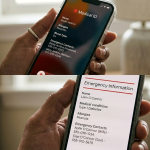
The smartphones that we carry around with us can be used for just about everything - from banking to social media. But one of the most powerful tools your phone offers is often overlooked: its ability to act as a digital medical alert bracelet in a crisis. If you are ever in an accident and/or unable to communicate, first responders are trained to check your phone for emergency information. On older phones people would put in contacts with the prefix "ICE" - or In Case of Emergency. But on … [Read more...]
February 1, 2026 By Computer Techs
The most dangerous new threat on your computer is not a virus, and may come from someone you know
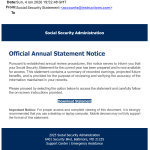
Updated 4/24/26: One of the most dangerous scams this year is an email that appears to come from someone you know— a neighbor, friend, a professional service provider or even a family member. The message might say something like “RSVP for the celebration (of life)” ,“Click here to view the invitation.”, “Review this important document”, “Check out the pictures” or "We’re updating our records”. Click each of the 2 screenshots above to view a larger version of the phishing … [Read more...]
January 26, 2026 By Computer Techs
New computer recommendations
Updated 9/1/26: Sticker shock: RAM and SSDs are major costly components that are used in computers. Due to demand by AI data centers and global supply shortages for RAM and SSDs since late 2025, prices for new computers have increased by an average of a few hundred dollars this year. But sale prices still exist. You may be reading this because the operating system on your existing computer is no longer supported. Since you'll likely be spending the next 5-10 years or more with your next … [Read more...]
January 14, 2026 By Computer Techs
How to save money on internet, phone and TV service in 2026
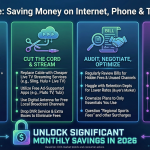
Saving money on internet, phone, TV, and cell service can be a game of strategy! Here are some tactics to consider: General Strategies: Negotiate your current bills: Call your providers and politely but firmly negotiate a lower rate or better deal. Mention competitors' offers or threaten to cancel. Be prepared to walk away. Bundle services: Consider bundling multiple services with the same provider. For example, Spectrum and AT&T both offer considerable discounts on wireless phone … [Read more...]