
We’ve all been there: you open your inbox and find a message that sets off alarm bells. Maybe it’s a “critical security alert” from your bank, an unexpected delivery failure notification, or an urgent invoice. Cybercriminals are getting better at crafting these fake messages, known as “phishing,” but they still leave behind a trail of breadcrumbs.
Here is our comprehensive guide on how to spot a fake email before you click, reply, or download anything dangerous. Treat all unexpected emails as guilty until proven innocent!
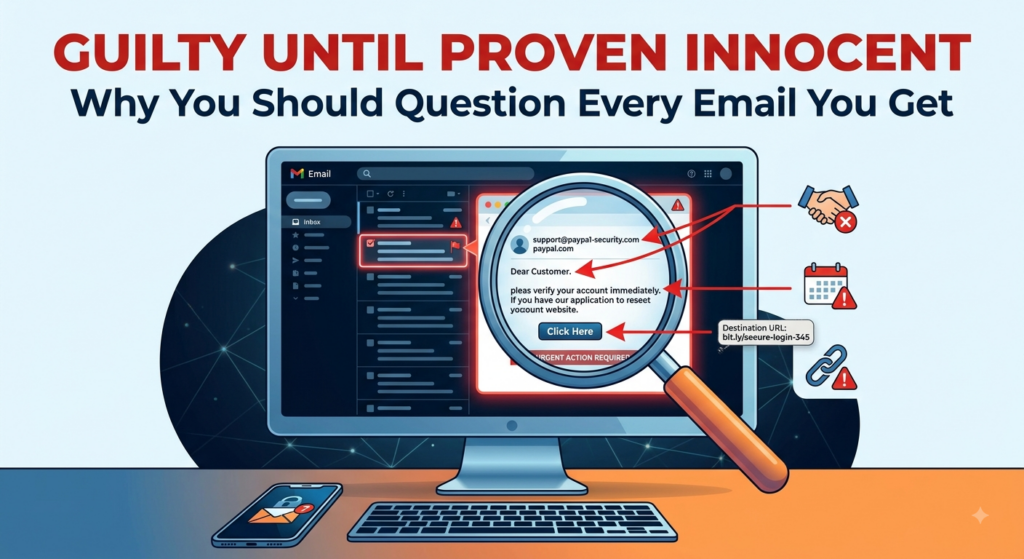
Scrutinize the “From” and “To” Email Addresses
Don’t just look at the display name of the sender—look at the actual email address hiding behind it. A scammer might set their display name as “PayPal Support,” but the actual email address might be a random Gmail account or a strange domain like support@paypal-security-update.biz. Additionally, check the “To” field. Is the email addressed directly to your specific email address, or does it say “undisclosed recipients”? A legitimate company you do business with will usually email you directly.
Check the Subject Line and Greeting
Phishing emails often use bizarre subject lines to get your attention. Look for excessive punctuation (like “URGENT!!!”) or weird capitalization. When you open the email, check the greeting. If your bank is emailing you, they will use your real name. If the email starts with a generic “Dear User,” “Dear Customer,” or just “Hello,” it is highly suspicious.
Beware a False Sense of Urgency
Scammers want you to act fast so you don’t have time to think critically. If the email claims your account is going to be deleted in 24 hours, that you’re facing legal action, or that you need to claim a prize immediately, take a deep breath. Legitimate organizations do not force you into rushed, panic-driven decisions.
Look for Poor Grammar and Misspellings
Slow down and read the email like a teacher grading a paper. Professional companies have marketing and copywriting teams that proofread their communications. If you notice awkward phrasing, obvious misspellings, or sentences that just don’t flow right, you are likely looking at a scam.
Check for Mis-formatted U.S. Phone Numbers
If the email asks you to call a customer service number, take a close look at the digits. Scammers operating overseas often make mistakes formatting U.S. phone numbers. You might see strange spacing, incorrect area code formatting, or international country codes (like starting with +1) attached to a supposedly local or national U.S. business. Emails created for U.S. citizens by U.S. corporations don’t usually include “+1” as part of the phone number.
Hover Over Sketchy Links (Look, Don’t Touch!)
Never click blindly. If there is a button or a hyperlink in the email, hover your mouse cursor over it without clicking. A small box will pop up showing you the actual destination URL. If the email claims to be from Amazon, but the link points to http://www.amaz0n-login-verify.com/login, it’s a trap.
Analyze Font and Color Choices
Legitimate corporate emails have a consistent brand identity. If an email looks like a ransom note with mismatched fonts, strange text sizes, or colors that don’t match the company’s official branding, be wary. You might also notice that the company logos look stretched, pixelated, or slightly outdated.
Use Browser AI Assistants to Verify a Page
If you end up opening a webpage from an email (or simply want to investigate a suspicious email safely in your webmail interface), you now have a built-in cybersecurity assistant right in your browser toolbar!
Whether you use Gemini in Google Chrome or Copilot in Microsoft Edge, you can leverage the sidebar AI to dissect a sketchy email or website in seconds. Simply open your browser’s AI sidebar and ask it to summarize or analyze the current active page. The AI can instantly cross-reference the page and point out red flags, helping you determine if the page you are looking at is a legitimate login portal or a known phishing scam.
When in doubt, remember the golden rule: Look, Don’t Touch. If you aren’t sure whether an email is real, do not click the links. Instead, open a new browser tab, manually type in the website of the company in question, and log into your account securely.
Stay safe out there, and feel free to reach out to Computer Techs if you ever need help securing your digital life!