
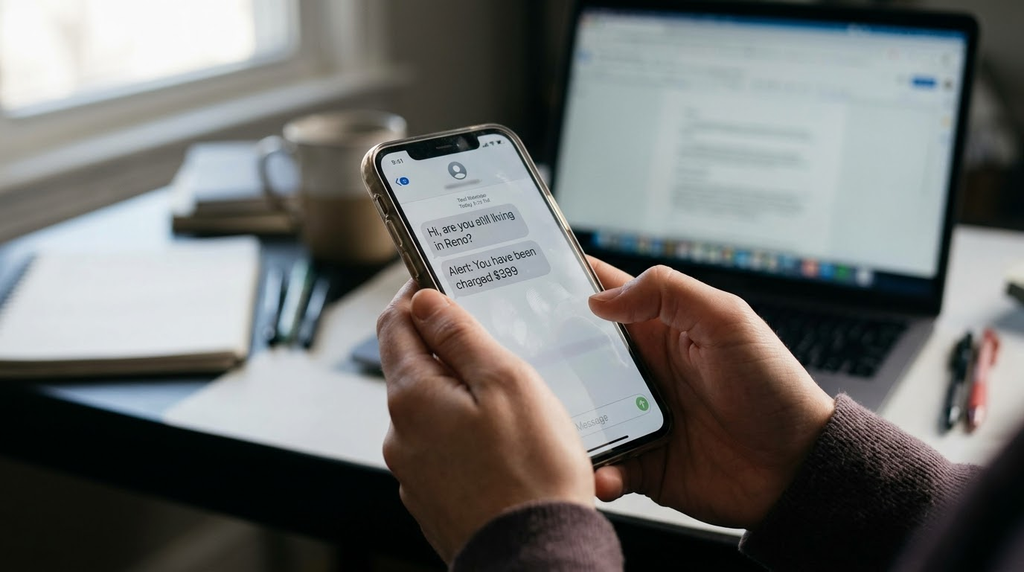
It starts with a simple ping on your phone or a new message at the top of your inbox.
Maybe it’s a text from an unknown number that just says, “Hi,” or “Are you still living in Reno?” Maybe it’s an email claiming, “Check out these photos,” or a sudden alert stating, “You’ve been charged $399 for your annual computer protection renewal.”
When you receive a message that seems meant for someone else, human nature—and common courtesy—tells you to reply and let the sender know they have the wrong number. Or, if a company you don’t do business with claims they just billed your credit card, your first instinct is to reply or call the number on the screen to demand a cancellation.
Stop right there. These messages are not accidents. Whether they play on your politeness, your curiosity, or your fear, they are carefully crafted traps designed to do one specific thing: incite a reply.
Here is a look at what is really happening behind the scenes of these messages, and why silence is your strongest defense.
Why Scammers Focus on Texts and Emails
Scammers love electronic messages because they are cheap to send in bulk, easy to spoof, and yield immediate reactions. While email open rates typically hover between 20% and 30%, SMS text message open rates stand at a staggering 98%—with 90% of texts opened within just three seconds of receipt. Because people read and react to text messages within seconds rather than hours, “smishing” (SMS phishing) has become one of the most popular avenues for fraud. Scammers rely on you reacting quickly before you have time to stop and think.
The 4 Common Baits Designed to Make You Reply
1. The Innocent “Wrong Number” (“Hi” or “Are you still living in Reno?”)
You receive a casual text message from a number you don’t recognize: “Hi,” “Did you hear from Sally?” or “Are you still living in Reno?”
Because data breaches have exposed a treasure trove of personal information—including names, phone numbers, and cities—scammers can easily toss a local reference into a text to make it feel personal. If you reply, “Sorry, wrong number,” the sender will usually apologize profusely, compliment you on how kind you are, and try to strike up a friendly conversation.
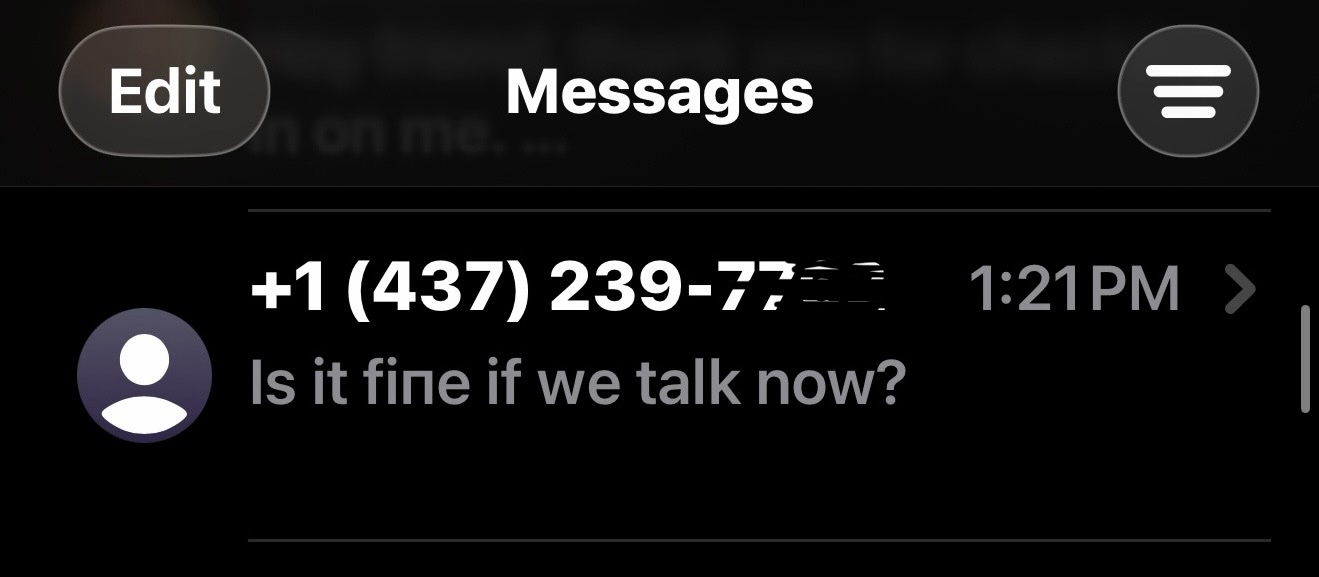
- The Trap: This is the opening move of a social engineering and financial scam known as “pig butchering.” By getting you to reply, the scammer confirms your phone number is active and belongs to a polite, responsive human. Over weeks or months, they attempt to build a manipulative online friendship or romance, eventually steering the conversation toward fake investment schemes or cryptocurrency ventures where victims lose thousands of dollars.
2. The Curiosity Hook (“Check out these photos” or “Click here to view the invitation”)
One of the most dangerous threats circulating right now involves a message that appears to come from a neighbor, friend, or service provider—or seems slightly misdirected—asking you to “Check out these photos,” “Review this important document,” or “RSVP for the celebration.”
- The Trap: Clicking the link—or replying to ask who sent it—puts you right in the scammer’s crosshairs. In many cases, clicking the link discreetly downloads a Remote Access Trojan (RAT) onto your computer. Because RATs are legitimate software programs used by corporate IT departments, standard antivirus software often fails to flag them as malicious. Once installed, scammers wait until you are away from your computer or asleep to go through your browser, password manager, and financial accounts. Another variant prompts you to sign into your Google, Outlook, Yahoo, or AOL account on a lookalike page, handing the scammer your login credentials, 2FA codes, and your entire contacts list so they can send the same trap to everyone you know.
3. The Panic Trigger (“You’ve been charged $399”)
You open an email or text message that looks like an official receipt from Geek Squad, McAfee, Norton, PayPal, or Amazon. It claims your subscription has auto-renewed and $399 is being deducted from your bank account—conveniently displaying a large, bold phone number to call if you want to cancel and get a refund.
- The Trap: Legitimate companies do not send invoices out of the blue for services you never ordered. Scammers use the $399 figure to trigger panic so you will call their fake call center. Once you are on the phone, they will try to coerce you into giving them remote access to your computer or logging into your bank account so they can supposedly “process the refund”—which they actually use to steal your money.
- Click to watch a brief video of how this scam works.
4. The “Unsubscribe” or “STOP” Trap
When junk emails or spam texts pile up, you might be tempted to click the “Unsubscribe” link at the bottom of the email or reply “STOP” to a rogue text message.
- The Trap: On legitimate newsletters from businesses you actually signed up for, the unsubscribe button works as intended. On unsolicited spam, however, clicking “Unsubscribe” or replying to a random sender sends an immediate ping back to the scammer confirming two vital details: your address or phone number is active, and a real person is reading the messages. Once verified, your contact information is bundled and sold to other cybercriminals, multiplying your junk messages tenfold.
5. The Unsolicited “Pre-Approved Loan” Voicemail or Text
Your phone rings—or goes straight to voicemail—and you see a voicemail transcript or accompanying text message from someone with a friendly name like “Denise” claiming your application for a $63,000 personal or business loan is nearly finalized, pre-approved, or just waiting on one last verification step. It leaves a toll-free or out-of-state callback number and urges you to call back before the offer expires—or leaves you panicked that someone took out a massive loan in your name.
- The Trap: Whether you call back out of curiosity about the money or out of fear that you are a victim of identity theft, calling the number is the trap. Honest financial institutions do not cold-call, text, or leave vague voicemails offering tens of thousands of dollars out of the blue, nor will they ask for your personal details over an unsolicited call. If you call back or reply, you first flag your phone number as an active, high-value target—guaranteeing relentless daily calls from dozens of other spoofed numbers. Worse, the fake “loan officer” on the other end will demand your Social Security number, bank routing details, or an upfront “processing fee” via wire transfer or payment app to either “release” the non-existent funds or “cancel” the supposed application.
- Click here to read “The “Guaranteed Loan” Scam: Why the Daily Voicemails and Texts Won’t Stop”.
How to Spot the Red Flags in Seconds
At Computer Techs, our #1 rule for staying safe online is to treat every unexpected message as “guilty until proven innocent.” Before you ever consider clicking or replying, slow down and look for these telltale signs:
| Red Flag | What to Look For |
|---|---|
| The Sender’s Source | McAfee won’t email you from an @gmail.com address, and your bank or mobile carrier will typically text you from a 5- or 6-digit “short code,” not a standard 10-digit phone number or an email-to-text gateway. |
| Non-U.S. Formatting | Look for phone numbers starting with a +1 country code prefix or unusual dash placements. U.S. corporations writing to U.S. customers rarely include +1 in their support numbers. Also watch for non-U.S. date formats (Day/Month/Year). |
| Generic Greetings | Companies you actually do business with know your name and will address you personally—not as “Dear Customer,” “Dear User,” or “Undisclosed Recipients.” |
| Grammar & Punctuation | Read the message like a teacher grading an English paper. Look for extra spaces before periods, random capitalization (like “MailBox” or “Purchase of Digital Assets”), and awkward phrasing. |
| Urgency & Scare Tactics | Demands to act within 24 hours, threats to lock your account, or warnings of immediate charges are classic psychological tricks designed to make you act before you verify. |
What You Should Do Instead
- Do Not Reply, Click, or Call: Ignore the message completely. You wouldn’t let a stranger knocking on your front door walk into your house—apply that exact same standard to your inbox and text messages.
- Verify Independently: If you are genuinely worried about an unrecognized $399 charge, do not use the phone number or link in the message. Open a web browser, type your bank or credit card company’s official website address directly into the address bar, or call the number printed on the back of your credit card.
- Use Built-In AI to Double-Check: If an email looks convincing and you aren’t sure, you can use Gemini in Chrome or Copilot in Edge to analyze it. Open the sidebar while viewing the email and ask: “Is this legit?” AI assistants are trained on massive datasets of known attacks and will quickly flag Geek Squad invoice scams or phishing templates.
- Report Spam—Don’t Just Delete: Simply deleting a junk email removes it from sight, but it teaches your email provider nothing. Always use the Report Spam or Mark as Junk button. This trains your email provider’s machine learning filters to block similar messages in the future.
Think You Might Have Taken the Bait?
If you accidentally clicked a link in an unexpected invitation, replied to a suspicious message, or allowed someone you don’t know to remotely access your computer or smartphone, act quickly. Disconnect your computer from the internet or turn it off immediately, and never use a compromised email account until you are certain all unauthorized forwarding rules, filters, and remote access tools have been removed.
If you need professional help verifying a suspicious message, removing a hidden remote access tool, or securing your accounts with two-factor authentication and passkeys, contact Computer Techs—we’re here to make sure your devices, accounts, and personal information stay safe.