
The FTC is reporting a new phishing scam that looks a lot like the CAPTCHA requests you might be used to seeing. Real CAPTCHAs give you image- or text-based tasks to prove you’re not a robot — something like typing letters and numbers exactly as they appear, or matching pictures of things like fire hydrants or traffic lights. Here’s how the fake CAPTCHA requests happen…and how you could wind up installing malware on your own device.
You get an unexpected CAPTCHA request while browsing a website. The screen looks a lot like a regular CAPTCHA, asking you to verify you’re human. But the message says to type a series of commands — something like “Windows + R,” then “Ctrl + V,” and then “Enter”. The screen might say “security verification,” but you’re actually following the steps to paste and run hidden malware on your device. Once it’s there, scammers can quickly steal your email account login data, banking credentials, or any other information they can get access to.
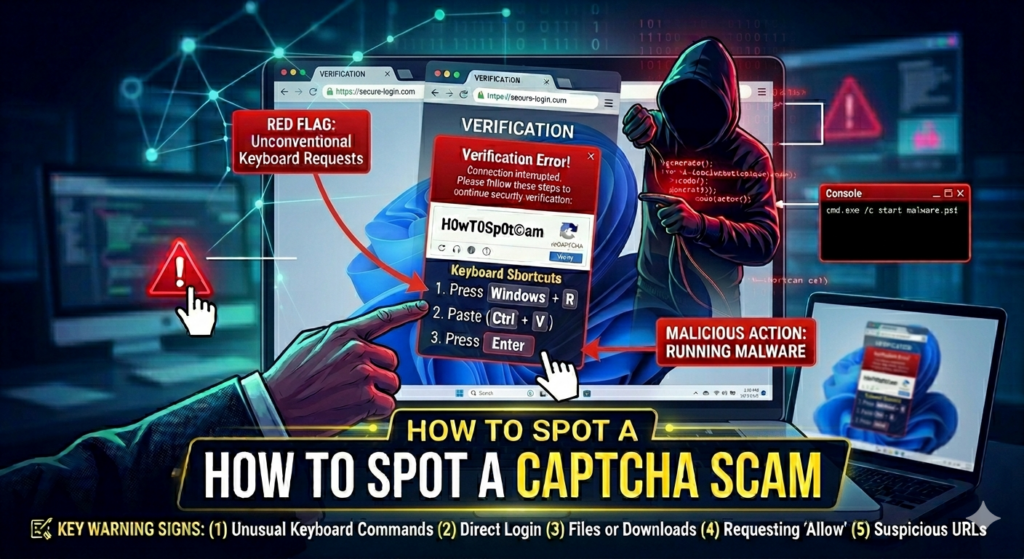
Real CAPTCHAs won’t ask you to run commands on your device. If you notice something downloading to your device after responding to a CAPTCHA, act quickly to disconnect from the internet or turn off your computer. This stops scammers from accessing your online banking, shopping or email accounts.
If you’ve already followed on-screen instructions to paste malicious commands from a shady CAPTCHA prompt, contact Computer Techs for help to make sure your computer is safe to use.