Computer / Internet Tips & News – exclusively for Computer Techs clients
Support for Windows | macOS | iOS | Android
Welcome to the Computer Techs Computer / Internet Tips & News blog. This purpose of this site is meant to provide a service to our valued customers, by keeping you informed with the latest news and tips related to your computer and the internet. Consider using the search box on the left side of the website to help you find a specific topic or article, or scroll through articles below to learn something new.
Get $25 Off your next service call for recommending Computer Techs
If you’re happy with our service, please consider recommending Computer Techs to a friend or relative. If we service their computer, you get $25 Off your next service call.
The details: Please have your friend or relative mention your name during the appointment, or after the appointment contact Mark Cobb with the name of the person that you recommended/referred. The referred person must be a new Computer Techs customer and not reside in the same household as the referrer.
There has been lots of attention lately by the news media about data breaches, phony tech support scams and computer ransomware – all things that we’ve been warning clients about over the years in the Computer Techs monthly email newsletter and website for clients.
Data breaches at Target, Home Depot, Anthem and others have inspired scammers to launch phishing email campaigns and cold-calling operations in hopes to gain the trust of the recipient, then persuade them to reveal personal information and send money.
If you receive an unexpected email from a friend, business or organization – never click a link or button in the email or open an attachment. It’s best to call the person or business, or type in the web address of the business to access their web site and confirm the validity of an email. However be careful when searching the internet for a business, as there are often ads that appear along with search results paid for by untrustworthy businesses running bogus tech support scam operations.
If you receive a telephone call, never give personal, computer or financial information over the phone. If in doubt, tell the caller that you will hang up and initiate the call by calling the number listed on your associated ID card or credit card to confirm the validity of the call. Microsoft nor any other legitimate computer company will ever call, email or pop-up a warning on your screen concerning problems with your computer. Never feel pressured to reveal information or act right away. Feel free to call Computer Techs for a 2nd opinion.
Phishing emails attempt to gather personal information such as passwords, account information or credit card numbers. The emails appear to be from a legitimate source – your bank, internet or email provider, or a business that you may have a credit card on file with. They are often designed to mimic the appearance of a legitimate business including company email addresses and logos. But with a closer look, you can often spot phishing emails from some of the characteristics listed below.
In any email that you receive, you should never click on a link in an email in which you are not 100% sure that the email came from the identified sender – and you know and trust that sender. If in doubt, contact them by typing their website address into your web browser and look for contact information on their website. No legitimate company will ask for a password or financial information via an unsolicited email or phone call.
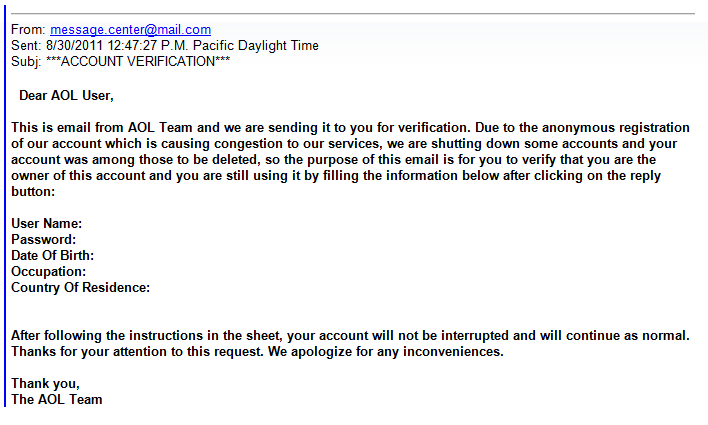
In the example above there are several characteristics that identify that the email is a phishing attempt:
Grammar – notice the sentence “Please you are to fill in the below informations to validate…”
Punctuation – Look for words that should/should not be capitalized, periods and commas in the wrong place, spaces that should/should not exist. Analyze it like your school English teacher would.
“From” – When hovering over the “From” address, it displays “web_upgrade2dsk@…” A legitimate email will be come from addresses such as “info@[company].com” or “customerservice@[company].com”. However the email address that it’s coming from should not be your only determination whether or not an email is real since an email address is easy for spammers/hackers to spoof.
“To” and greeting – The email shown is addressed to “undisclosed recipients” and “account owner”. – A company that you already do business with will send an email addressed to your email address and name.
A scare tactic – “Failure to follow this process … result in loss of important information”.
A sense of urgency for immediate action – “…exceeded the set storage limit”
Personal/private information – A company that you do business with already knows your name, email address, password, etc. Unless you are logging into your account on their official website, they would not ask you to enter it into an email or web form and send it back to them.
In the above example from “AOL” above, what characteristics do you see that it is a phishing email? Please post a note in the comments below.
This official-looking email includes bank logos and it appears to come from a bank email address. Yet if you carefully read the message in the email, grammatical and capitalization errors give a clue that this email did not come from a billion-dollar corporation. This email is attempting to get you to enter banking information into a form and opening an attachment to install a virus .
Accidents and disasters happen. Hard drives fail. Portable devices get lost or stolen. New viruses encrypt data then charge ransom to unlock it. Fortunately data backup is not expensive anymore, so there’s no excuse for your data not being backed up. If you don’t know how to backup, we can setup a solution based on your needs.
A backup means that your important documents, pictures, music, emails, contacts, etc. exist in more than one location, in the event that the primary data is lost.
Smartphones and tablets should be backed up to services provided by the maker of the phone’s operating system such as Apple’s iCloud or Google’s Android backup & sync settings.
If you’re not sure how to backup your computer and devices, please contact us to setup an appointment so that we can help you start your backup routine today.
Some people think that nobody would be interested in reading their email, so their email password doesn’t need to be secure. However if a hacker accesses your email consider the following common occurrences:
A hacker can change your password and lock you out of your account.
A hacker can go to financial and shopping websites and have password reset requests sent to your email address. With access to your financially related websites in the hands of a bad guy, you could potentially lose thousands of dollars.
A hacker can copy your contact list and/or send emails on your behalf asking for money or send spam and malware that appears to come from you.
I suggest reading this more in-depth article by security researcher and former Washington Post reporter, Brian Krebs: The Value of a Hacked Email Account.
The 2 major Internet service providers in Reno – AT&T and Charter/Spectrum – offer free email addresses as part of their service. But the email “service” is an afterthought which they don’t make any money on. AT&T’s email is provided by Yahoo, has a history of being hacked and is often filled with advertisements. Charter’s email interface is slow and clunky. Spam filtering on both services is poor to non-existent. Both AT&T and Charter also let you view your email on an email app on your computer or mobile device, but syncing between devices and web browsers is often problematic, and syncing your contacts isn’t possible with Charter/Spectrum’s service.
Fortunately there are very good alternatives to AT&T’s and Charter’s email, and you can continue to use your present email address if you choose. Google’s Gmail and Microsoft’s Outlook.com offer better security, spam filtering and less advertising – all free of charge.
If you’re frustrated with your Internet service provider’s email, contact us to customize an email solution to your needs.
When purchasing a new printer, there are several reasons you should consider getting laser vs. inkjet.
We are often asked to troubleshoot printing problems with inkjet printers. With Nevada’s dry climate, if you don’t frequently print something the ink in inkjet printers often dries out and clogs the ink cartridges and print heads, thus reducing print quality or completely rendering the printer useless.
When shopping for a printer you may be inclined to get an inexpensive printer because you don’t print very often. Though inkjet printers are usually less expensive, the cost of the ink and repair can make it a more expensive investment in the long run.
Let’s look at the pros and cons…
Pros of laser/LED printers:
The toner powder that’s used in laser printer toner lasts longer than ink – typically thousands of pages (vs hundreds of pages for standard ink cartridge printers). You may only have to buy more toner cartridge(s) every few years.
Cost-per-page of toner vs. ink is lower.
The toner isn’t susceptible to drying up or clogging the printer.
Laser printers print faster.
Cons of laser/LED printers:
The initial equipment cost of a laser printer is usually more expensive. Color laser printers are usually hundreds of dollars more than their inkjet alternatives.
Laser printers don’t print high-quality photos.
All-in-one laser printers are usually larger and may not fit if you have a small space to place your printer.
The technical differences between inkjet and laser/LED printers
Inkjet and laser printers operate on very different technologies, each with their own strengths. Here’s a breakdown of how they work:
Inkjet Printers
Technology: Inkjet printers spray tiny droplets of liquid ink directly onto the paper. These droplets can be as small as a few microns, allowing for precise details and vibrant colors.
Process: They use one of two methods: thermal inkjet (heating the ink to create bubbles that force the ink out) or piezoelectric inkjet (using vibrations to eject ink).
Best For: High-resolution photo printing and documents requiring vivid colors. Inkjet printers are generally slower and more suitable for low-volume printing.
Laser Printers
Technology: Laser printers use toner, a powdered ink, and static electricity to transfer the image or text onto the paper.
Process: A laser beam “draws” the image on a drum inside the printer, creating an electrostatic charge. The toner adheres to the charged areas, and heat is used to bond the toner to the paper.
Best For: Fast printing of high-volume, monochrome documents. They are great for efficiency but less suitable for detailed photo printing.
If you’re debating which one suits your needs, it boils down to what you’re printing and how often.
Amazon Trade-In lets you trade in your electronics in exchange for an Amazon.com credit – typically at a higher value than most other trade-in programs.
Gazelle is an on-line service where you can get money or donate gadgets you no longer use such as cell phones, digital cameras, laptops, MP3 players, etc.
Best Buy’s Tech Trade-In also offers a way to receive a Best Buy gift card for any old gadgets you want to get rid of.
If you don’t want the hassle of trying to sell your gadgets on eBay or Craigslist these resources are a good way to go.
Feel free to post your experience with these or other services in the comments section below.
Remote Computer Maintenance takes approximately 1 hour. To schedule your appointment on the calendar below click on an available date in bold, click on a time, fill in your name and contact info, then choose Pay Later.
Most households have multiple computing devices these days – such as desktops, laptops, smartphones and tablet portable devices – and many want the ability to synchronize files between their devices.
There are many companies that offer cloud (aka “over the internet”) syncing and storage services. In this article I highlight 3 of the most popular – Google Drive, Microsoft OneDrive and Dropbox. All 3 of these services will backup and sync one folder and any sub-folders within it. Your computer can be configured to store your pre-existing folders of Documents, Pictures. Music, etc. inside the synced folder. Since the files are accessible from multiple devices and your personal web site means that those files are backed up and accessible should one or more of your devices become damaged, lost or stolen.
Some of the main features and benefits of the services include:
2-15 GB of online storage for free, with paid plans for more storage as needed.
Automatically syncs when new files or changes are detected.
Work on files even if you’re temporarily not connected to the Internet. Your changes sync once your computer has an Internet connection again.
If you don’t already have a Google/Gmail and a Microsoft/Outlook.com account, there are several reasons that you may need one besides just for a secondary email address.
A Google/Gmail.com email is used for:
A primary or secondary email address due to Gmail’s superior junk/spam filtering and syncing of contacts and calendars with a mobile device
Using Google Drive online backup and synchronization folder (similar to Dropbox), and the accompanying Google Docs, a free online document creation and management suite
Required on an Android smartphone or tablet for backing up the device’s settings, purchasing apps and using location services
A Microsoft/Outlook.com account is used for:
A primary or secondary email address due to the Hotmail.com/Live.com/Outlook.com superior superior syncing ability of mail, contacts and calendar between your computer and mobile devices


 If you receive an unexpected email from a friend, business or organization – never click a link or button in the email or open an attachment. It’s best to call the person or business, or type in the web address of the business to access their web site and confirm the validity of an email. However be careful when searching the internet for a business, as there are often ads that appear along with search results paid for by untrustworthy businesses running bogus tech support scam operations.
 Print This Article and place this article near your computer and telephones.