The “Heartbleed bug” is a flaw in the OpenSSL encryption standard that is used by half a million websites which was uncovered on April 7. A majority of websites that require passwords for access use OpenSSL encryption to “scramble” the data transferred between your computer and the website’s server. OpenSSL has since been patched and millions of websites – many that you likely use – are being updated and new encryption certificates and keys are being issued.
So what does this all mean for the average computer user? Though it’s unclear at this time if the flaw was exploited on any of the websites you use, you should change your passwords. Here is a website that you can use to check to see if the websites that you use were impacted by the bug, and if it is now safe to change your password: Check to see if websites that you use were vulnerable to the Heartbleed bug: https://lastpass.com/heartbleed.
Now is a great time to implement a password system that makes your passwords secure, different for every site, yet easy to remember. See How to change your email password.
AVG AntiVirus releases program updates from time-to-time, and you will likely see pop-ups similar to those pictured below in the lower-right corner of your screen when an update is available. Whenever there’s an update that requires your interaction, AVG will try to entice you into upgrading to a paid version, add complimentary software or make other unnecessary changes. But if you follow the instructions below, you can continue with the free protection that is recommended for most home computer users at no charge. If updating AVG seems like too much trouble, see the bottom of this article for other options.
It not a matter of if your hard drive will fail – it’s when. The average life of a hard drive is 5 years. Your computer’s hard drive stores all of your documents, pictures, music and other important files that you keep on your computer. Are you prepared if tomorrow a virus locks you out of all of your files, your hard drive fails, or your data is stolen or damaged by fire or natural disaster? Now is the time to backup your important data – before disaster strikes.
I use 3 methods for data backup, and it is recommended that you backup your data similarly. I perform a daily computer image backup of my entire hard drive to an external hard drive attached to my computer. Secondly I use Carbonite to automatically backup my data twice daily via the internet to a secure data center in Utah. Lastly I sync/backup my Documents folder to DropBox or Google Drive, so that I can also easily access my frequently used files from multiple computers and devices.
Are you prepared if you lost access to your email account? If a hacker found out your password or security questions, they could delete all of your contacts or lock you out of your account forever. But if you setup 2-step verification for email access before a hacker does – you can easily regain access to your account. 2-step verification often involves allowing your email provider to send a text message to your phone if someone tries to access your email account, or if you forget your password. Click here to find out how to do it.
Most banks offer online banking services which let you check account balances and cleared transactions, transfer funds between accounts and pay bills directly from your bank account without writing and mailing a check.
I have been using internet banking for over 10 years. My favorite feature is Bill Pay – the ability to schedule bill payments that will be automatically deducted from my checking account on a future date that I specify. I pay utility bills, car payments, credit cards bills and even my lawn care company using the bill pay service that my bank offers. I not only save time, I also save money because I no longer have to buy stamps or worry about checks getting delayed or lost in the mail.
Bank of America has online tutorials on how to use Bill Pay and other features of online banking – your bank may offer similar tutorials.
Online banking on your computer, tablet or smart phone is secure because transactions are encrypted between your device and the bank’s computers. Banks require the use of a secure username and password and other authentication measures to help prevent unauthorized access to online accounts. In many ways online banking is safer than handing your credit card to a server at a restaurant, or having your checking or credit card account information being handled in the mail.
Computer Techs offers one-on-one tutoring on how to use online banking. Contact us to schedule an appointment.
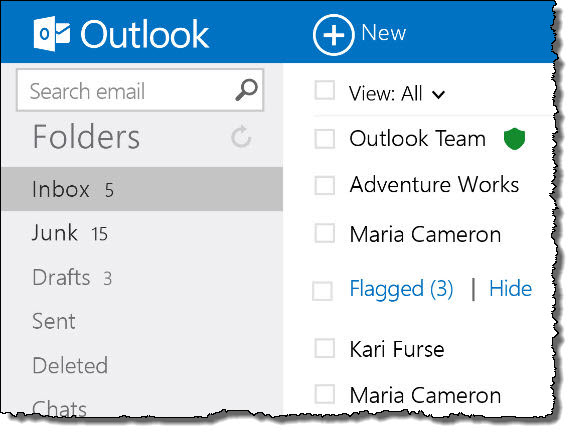
This month Microsoft officially launched its new email service and update to Hotmail – Outlook.com. Using the name of Microsoft’s “Outlook” business email, contacts and calendar management program, Outlook.com is a website that offers an uncluttered and easy-to-read design plus many more features that extend beyond email.
Computer Techs recommend having more than one email address with more than one service, and now Outlook.com is a logical choice to use as your primary or secondary email service.
Some of my favorite features of the new service include:
You can create an “alias” or a second email address that you can give to businesses or specific people that can be used to automatically filter specific email messages.
Outlook.com can be setup to sync your mail, contacts and calendars with iOS and Android mobile devices, or through Outlook and Windows Live Mail on your computer.
Outlook.com offers security features that will allow you to login to your account, reset a forgotten password or recover a hacked account via a text message, phone call or email sent to another address that you have access to.
You can easily access your personal Microsoft SkyDrive account, which lets you sync and store files between multiple devices and “the cloud”. The best feature of SkyDrive is easy access to the free Word, Excel, PowerPoint and OneNote web apps, which let you create, view and edit documents, spreadsheets, etc. without needing to purchase Microsoft Office or have the full Office suite installed on the computer that you’re working on.
If you’d like help setting up an Outlook.com email address, importing your contacts, setting up the service with external programs or mobile devices, and a tutorial – contact Mark Cobb at 775-742-1230 or via email at mcobb@CTreno.com
Available addresses are going fast (ie. “yourname@outlook.com”), so you should sign-up for an account at www.outlook.com soon. You can also get the same look and features but get a shorter email address (@live.com) by signing up for a new account at www.live.com.
More information about Outlook.com can be found on Microsoft’s website here.
Over the years we’ve helped lots of clients who’ve had their email account hacked – typically a Yahoo, Hotmail or AOL account. They usually first notice the problem when they are contacted by someone in their email contacts about unusual requests for money or a gift card. Other signs that an email account has been hacked include:
Lots of emails from “mailer-daemon” in a short period of time
No new email in the Inbox, and being filtered to the Trash or Archive folder
Some or all previous email have been deleted
All contacts have been deleted
“Reply-to” address changed
All messages being forwarded to a different address
Email signature added or changed
The language changed to something other than English
When attempting to login to their email some have discovered that their password has been changed and they are unable to access their account.
If your Yahoo account has been compromised, below are some helpful links:
If you’re still unable to access your account after following instructions in the resources above, you can call Yahoo at 866-562-7219 or AT&T at 800-288-2020.
It’s important that you DO NOT use your email account to send messages until you are absolutely sure that the hacker no longer has access to the account, all changes that were made are reversed, and two-factor authentication is enabled on the account to prevent future unauthorized access. If you need professional help with getting your email account back and everything fixed, give us a call.
People tend to procrastinate. As you think about your new year’s resolutions or goals, please consider printing this article and complete these 5 recommended technology goals for 2013.
2. Adopt a password system similar to this one that makes passwords for different things easy to remember. If you already have a unique password for each web site that you log into, use a password manager to store your passwords using a method that’s more secure than a little black book.
4. Adopt a backup system so you won’t lose your important files and photos when your computer’s hard drive crashes – or in the case of theft, fire, flood, etc. Here’s how to do it.
Please Print This Article and keep this list near your computer to remind you of common computer scams that can cost hundreds to thousands of dollars to unknowing individuals.
Calls from Microsoft. If you get an unsolicited call from someone claiming to be from “Microsoft”, “Windows”, “Apple”, “Google”, “Amazon” or any other well-known name, and claiming that there are problems with your computer or account – it’s a scam. The Federal Trade Commission has been cracking down on telemarketers masquerading as major computer companies that scare people with false claims that their computer or security is in danger, and eventually offer to fix the problem for a few hundred dollars. See Avoid Tech Support Phone Scams.
Remote support scare tactics lure you into paying to fix non-existent problems. Similar to companies in the scam mentioned above, there are foreign companies that advertise on search web sites such as Yahoo or Google that may help you with your initial problem, but then claim that they detect severe problems with your computer and attempt to coax you into a yearly tech support plan often costing hundreds of dollars. A recent variant of this scam has popped up on compromised websites which displays a warning message claiming that your computer has a severe problem and that you need to call a number displayed on the screen in order to fix it. See Learn how to spot scams that pop-up on your screen and Companies Pushing Tech Support Yearly Fee.
Deceptive ad links that show up in internet search results – Click to view larger image
Unusual/unexpected email from people you know. You may receive an email from someone you know asking for money, asking you to “check out” something on an unfamiliar web site, or asking you to open an unsolicited document. In these cases the email account of the sender has been hacked, and the hacker/scammer is sending emails to all of their contacts in attempt to get money directly via wire transfers, or indirectly via spam schemes. See Email Spam From Someone You Know Links to Websites That Hack Your Password.
Unusual/unexpected email from a business. You may receive an email from a business such as UPS, Amazon, United Airlines, Verizon, Apple, Google or PayPal that confirms a large transaction or delivery of an item, or a problem with your account. The email attempts to lure you into clicking a button, link or attachment in the email that would ultimately install malware or a virus on your computer. Others may simply ask you to reply to the email and give your email login credentials, which would ultimately result in a hacker being able to access your email account. See How to Spot Fake Email From Legitimate Companies, and Emails that Phish for Your Login Credentials On The Rise: What You Need To Do To Stay Safe.
Email account password hacking due to password re-use. Your email account can easily be hacked if you use the same password to login to your email as you do any other website that is vulnerable to hackers. See the dangers of using the same password for different websites.
If you think you’ve been a victim of a computer scam and need help or advice, please contact Computer Techs at 775-624-6888 or contact your technician.
Over the years we’ve been contacted by dozens of clients who have had their email account hacked and sending out spam to all of their contacts. This happened shortly after clicking on a link in an abnormal email from someone they know. The website that the link opens typically shows a video while capturing email address and password credentials, then hackers log into the email account and send similar spam emails to all of their contacts.
The subject line of the emails are vague in hopes that you’ll be curious and open it. Examples include:
– Hey
– Hi
– fwd:
– re:
Some of the phrases in the body of the emails include:
– wow this is amazing look into this [link]
– this is awesome [link]
– wow can you look at this [link]
– wow this is crazy check it out [link]
– this is pretty amazing you should give it a look [link]
– [link only]
Other variants coming from the email address from someone you know include links to an unknown website that will:
– Ask you to enter your email login credentials in order to view a document or photo
– Ask you to install Java or Flash Player in order to view the website
The methods above are tricks to get you to divulge private information or to install malware on your computer.
Security reminder: Do not click on links in an email that you are not expecting or if you are not absolutely sure that the link will open a trustworthy website. If you discover that your email account has already been hacked, see our information about what to do if your email account has been hacked.
We get a lot of calls where the person’s account has been hacked. The hacker has sent spam email to their contacts, and often copies their contact list for the purpose of sending future emails and forging their name and email address. Others have had emails sent to their contacts asking for money because they are in distress in a foreign country while on vacation. After their account got hacked, people usually ask us how it happened. Typical methods that hackers are able to access email accounts include….
1. Guessing an insecure password to access your account. Examples of insecure passwords include common names, names of a pet, words listed in a dictionary, or using the same password for different websites.
2. Guessing the answer to your account security question(s), then resetting the password so that the account can be accessed.
3. Insecure web site databases are being hacked and the usernames and passwords are being used to log into email and other accounts. For example, here’s a common scenario that could happen to you:
You discover xyzrecipes.com and register for an account so that you can access their exclusive recipes that are only available to registered users. They require an email address for a username, and ask you to create a password to access their site. To make it easy to remember, you simply use the same password that you use to access your email – since most people wouldn’t care if somebody got access to your xyzrecipes.com account.
However, a few weeks later a hacker breaks into the xyzrecipes.com user database and copies all the email addresses and passwords. The hacker then tries to access your email account using the same password that you used to register at xyzrecipes.com. If it’s the same password, they now have access to your email account, make a copy of your contact list and send spam messages to your contacts that look like they’re coming from you. Worse yet they can read all of your previous emails, learn about the people you correspond with and financial transactions that you make, and/or change your password – locking you out of your email account.
4. If you click on a link in an email which leads to a malicious website, the website can capture your email login credentials.
5. Sending an official-looking email asking for email login credentials. (See sample below)
What you should do if you’ve been hacked, and tips to prevent being hacked.
If your email account was hacked, immediately change your password. (If your email address is the master account for AT&T DSL service, see note below*) Below are a few things you can do to help prevent your email account(s) from being hacked.
1. Use a password system/pattern so that you have a unique memorable password for each web site. I recommend putting part of the letters of the website in the password. (See creating secure memorable passwords.)
2. If the account has a password reset question (or account security question – ASQ), make sure that the answer to your question is something that a hacker would not know or easily guess.
* Note: If your email address is the master account for an AT&T DSL account, after changing your email password you need to call AT&T DSL at 877-722-3755 and have them give you your network password to program into your DSL modem or router. Otherwise you could lose your connection to the internet.


 Print This Article