Welcome to the Computer Techs Computer / Internet Tips & News blog. This purpose of this site is meant to provide a service to our valued customers, by keeping you informed with the latest news and tips related to your computer and the internet. Consider using the search box on the left side of the website to help you find a specific topic or article, or scroll through articles below to learn something new.


Get $25 Off your next service call for recommending Computer Techs

If you’re happy with our service, please consider recommending Computer Techs to a friend or relative. If we service their computer, you get $25 Off your next service call.

The details: Please have your friend or relative mention your name during the appointment, or after the appointment contact Mark Cobb with the name of the person that you recommended/referred. The referred person must be a new Computer Techs customer and not reside in the same household as the referrer.


[Old Article] AVG Anti-Virus Free 8.0 now available – download and install now

Filed under: Archived,Security,Tech Support - May 07 2008

AVG Free 8.0 is now available, and you may have already received a notice that updates for AVG Free 7.5 will not be available after specified dates.

In AVG/Grisoft’s usual manner to stimulate sales of their not-free products, they are highly suggesting that people upgrade to their 8.0 full-featured paid product rather than their 8.0 Free version. As in the past I still only recommend their free product since security “suites” which include firewalls and other features are redundant and can significantly slow down your computer.

If you are still using an old computer with Windows 98 or Windows ME, Grisoft has followed many other security software developers by not supporting the older operating systems in their latest AVG 8.0. If you’ve been putting off buying a new computer, now is a logical time to make the switch into the new century.

There are a few ways you can download and install AVG Free 8.0:

METHOD 1. If you see a window as show below on your computer…
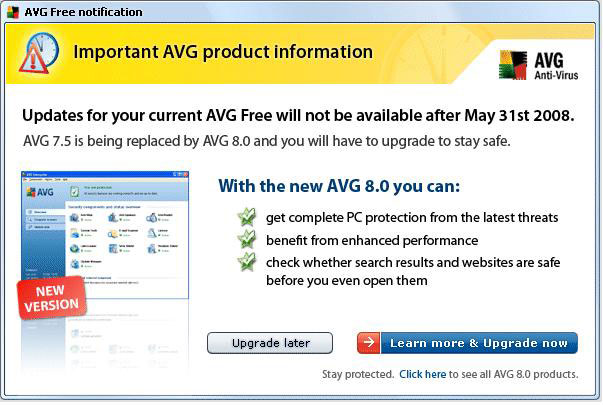
… To upgrade to the new FREE version, click the smaller “Click here” link at the bottom of that window which will take you to this web page as shown below…
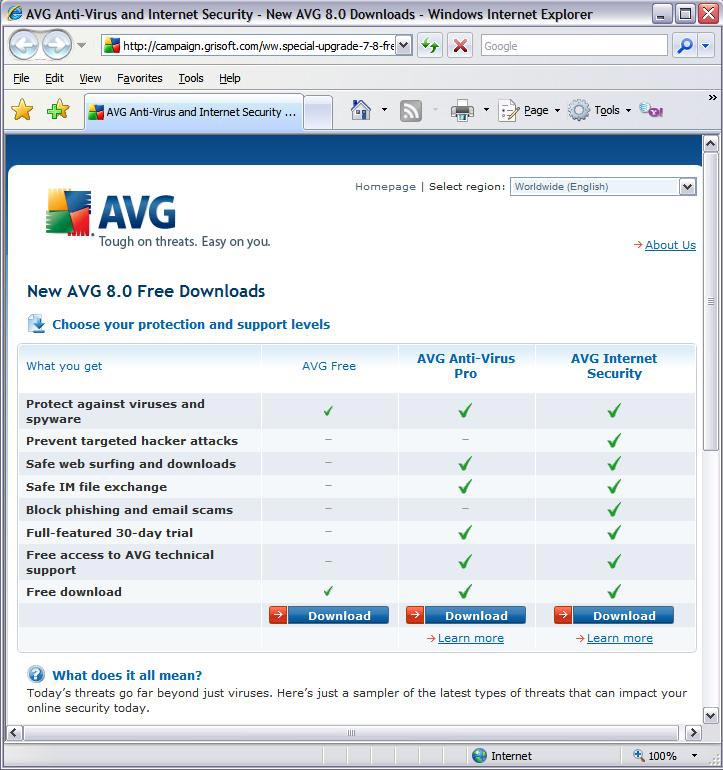
… Click on the “Download” button below AVG Free and follow the prompts to download. When prompted, save the file to your desktop (XP), Downloads folder (Vista) or another folder where you can find the file after you’ve download it. After the file has completed downloading, double-click the file on your computer “avg_free_stf_en_8_###a####.exe” to run the program which will uninstall your previous version of AVG and install the new version.

METHOD 2. I have also setup a direct link to the Free version download page at CTreno.com/avg Follow the download and install instructions listed above.

METHOD 3. I have put the installation file on the Computer Techs website. Click http://computertechsreno.com/files/avg_free_stf_en_8_176a1400.exe and follow the save and installation instructions described in Method 1.

During installation there will be a screen which asks if you want to install the AVG Security Toolbar – I recommend unchecking that box. If you leave it checked and later decide you don’t want the extra Internet Explorer toolbar to appear, you can right-click on a blank area of the Internet Explorer toolbars area, then left-click on “AVG Security Toolbar” to remove the checkmark and the toolbar.

Print This Article Print This Article

E-mail or text messaging may be the only way to communicate after an earthquake or other disaster

Filed under: Useful Websites - May 04 2008

After an earthquake or other major disaster, telephone and cell phone circuits may become overloaded with  people trying to reach friends and family.  In such cases you may be able to get messages through via e-mail or cell phone text messaging as mentioned in this article on the Reno Wireless Information website.

Print This Article Print This Article
Email gives false earthquake safety information

Filed under: Useful Websites - May 02 2008

With the latest earthquake activity in the Reno area, people have been receiving email messages about earthquake safety. One of them which describes a “triangle of life” safety zone is giving information that is not advisable in the United States where our structures are built with earthquakes in mind.

A description of the bogus email is on Snopes.com and the KOLO-TV website.

For real earthquake information, a good place to start is the Nevada Seismological Laboratory website. If you’re interested in viewing the latest quake map and detailed list of quakes in the Reno area – you can type CTreno.com/eq in your internet browser’s address bar, which re-directs to the official USGS webpage.

• You can take an interactive quiz that provides real earthquake information here.

• The 40-page “Living with earthquakes in Nevada – A Nevadan’s guide to preparing for, surviving, and recovering from an earthquake” is a PDF file which can be downloaded, saved or printed at this link.

Print This Article Print This Article

How to open Office 2007 files with earlier versions of Office

Filed under: Computing Tips - Apr 15 2008

When Microsoft released Office 2007 last year, they also changed the default file format that Word, Excel and Powerpoint files are saved. Office 2007 files add an “x” to the end of the file extension. For example Word documents used to have the file extension of .doc however the new Word 2007 files are saved with the extension .docx by default. Excel files now end with .xlsx, and Powerpoint files end with .pptx.

If you have a pre-2007 version of Word, Excel or Powerpoint you will need to download and install the Microsoft Office Compatibility Pack for Word, Excel, and PowerPoint 2007 File Formats to convert and view the new file type.

(more…)

Why haul your computer to a shop?

Filed under: Tech Support - Apr 03 2008

One reason I started an ON-SITE computer service business 5 years ago is because being one-on-one with customers allows me to ask questions about the computer and vice versa.

I just came across this investigative report that shows how taking your computer to a shop where the person checking-in the computer doesn’t ask detailed questions and is not likely the person doing the repairs, which can lead to mis-diagnosis and unnecessary repair bills.

Up-to-date earthquake information available on USGS website

Filed under: Useful Websites - Mar 24 2008

In my nearly 40 years as a Reno area resident, I have felt just a few earthquakes. However in the past few weeks I have felt 3 quakes, part of a swarm that started in late February that have been centered around Mogul/Somersett area. The quakes have measured around 3.0 and less, but the number of quakes swarmed in one area is alarming. The Nevada Seismological Laboratory has even dedicated a special web page to the recent activity.

If you’re interested in viewing earthquake activity you can visit the U.S. Geological Survey’s Real-Time Earthquake maps for California/Nevada at http://quake.wr.usgs.gov/recenteqs/latest.htm In my web browser I have created a link in my “Favorites” to a more detailed webpage which shows a map zoomed-in on the Reno area, and lists detailed information about every earthquake in a pane on the bottom of the page.

[Old Article] AVG Anti-Virus promoting new upgrade which most people don’t need

Filed under: Archived,Computing Tips,Security - Mar 22 2008

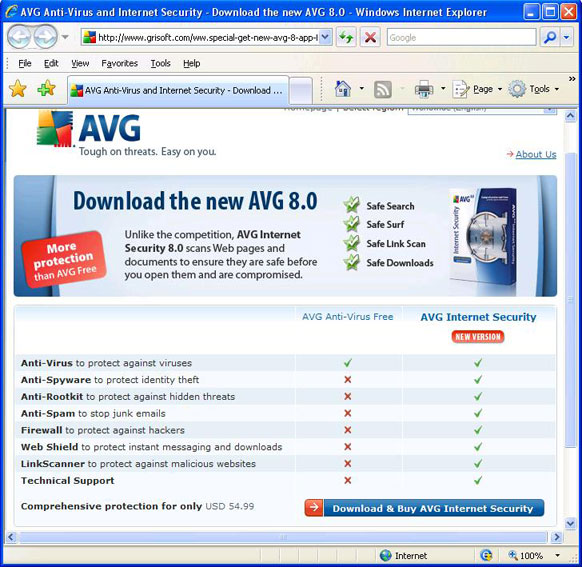
AVG Internet Security 8.0 advertisementAdvertisements in AVG Anti-Virus Free Edition have recently began promoting their new AVG Internet Security 8.0. In my opinion most people don’t need the additional features that AVG Internet Security 8.0 provides since most of the additional features are redundant or free from other sources. I list specific examples below, as well as a screen shot of the AVG website which compares the free and paid versions.

  • AVG Anti-Spyware and Anti-Rootkit are available separately in a free versions.
  • Anti-Spam is provided by many e-mail services, and the AVG program doesn’t filter spam in web mail.
  • Windows already has a built-in incoming firewall.
  • There are similar free products to “Web Shield” and “LinkScanner”. This type of protection is as only good as their list of known bad websites which are increasing faster than the protection programs can keep up. Your best protection against bad websites is behavioral by practicing safe internet surfing habits.

At this time for most people I recommend just keeping AVG Anti-Virus 7.5 Free Edition. Eventually they may offer 8.0 in a free version, and I will post updated advice if and when the time comes.

AVG Internet Security 8.0 website comparison


Windows Vista Service Pack 1 released – is it time to switch?

Filed under: Archived,Computing Tips - Mar 19 2008

Microsoft has released Service Pack 1 for Windows Vista, which includes all previously released security and reliability updates plus some additional enhancements. I installed Service Pack 1 last week and noticed that Vista seems much faster, though I no longer had sound after installing the update. After I re-installed the sound drivers, I was able to hear my sound again. If you have a computer with Windows Vista, I recommend installing the update when prompted. Be prepared to spend about 1 hour updating to Service Pack 1.

If you currently have a computer with Windows XP is it time to upgrade or switch to Vista? If you purchased a computer in the past few years, I do not recommend upgrading to Windows Vista. There are no compelling reasons to upgrade. If you have an older computer and want to get a newer, faster computer – you have an option of getting a new computer with XP or Vista, but just for a little while longer. After June 30, Windows XP will no longer be available from Microsoft. Currently a few manufacturer’s such as HP and Dell still offer a few new computer models with Windows XP, but they are only available by special order – you won’t find XP in “big box” stores.

If you are computer savvy and don’t mind change, I now think Windows Vista is not a bad choice when purchasing a new computer in most cases. If you rely upon pre-2007 peripherals such as scanners or printers, or older programs, you could have some compatibility issues or they may just not work. Be prepared to buy new hardware and/or software as well. But if most of what you do is internet, e-mail and word processing, you shouldn’t have any troubles with Vista after the initial “getting used to it” phase.

If you’re considering the purchase of a new computer, we can help you choose which version of Windows would be better considering your needs. We can also acquire a new computer for you, set it up, and transfer the files from your old computer.

Yes, there has been an increase in spam lately

Filed under: Computing Tips - Mar 17 2008

I’ve heard from quite a few people lately that have noticed an increase in spam in the past month. I’ve been getting it too. Read my recently updated page of spam prevention tips to help you decide if it’s time to get a better spam filter, change your e-mail address, or just wait until the latest spam filtering catches up with the latest spamming techniques in the cat-and-mouse game of spammers vs. anti-spam. You’ll also learn what you can do to help prevent the spreading of spam.

Online streaming video choices get bigger with launch of Hulu.com

Filed under: Useful Websites - Mar 12 2008

Most people have heard of YouTube.com – a popular video sharing website where you’ll occasionally find a clip from a TV show or movie. On March 12 Hulu.com went public featuring full length movies, TV episodes and clips from FOX, NBC and over 50 other content providers streaming to your computer over the internet for free.

Watching too much TV used to be a concern for parents – now watching too much computer could be the latest time waster. With virtually unlimited content available over the internet these days, it’s getting harder for some people to get away from the computer.

Below I’m sharing one of my favorite a clips from Hulu.com featuring one of my favorite TV shows, Family Guy. In the clip an all-too-common computer frustration is brought to light. Enjoy.

« Previous PageNext Page »