Phishing emails attempt to gather personal information such as passwords, account information or credit card numbers. The emails appear to be from a legitimate source – your bank, internet or email provider, or a business that you may have a credit card on file with. They are often designed to mimic the appearance of a legitimate business including company email addresses and logos. But with a closer look, you can often spot phishing emails from some of the characteristics listed below.
In any email that you receive, you should never click on a link in an email in which you are not 100% sure that the email came from the identified sender – and you know and trust that sender. If in doubt, contact them by typing their website address into your web browser and look for contact information on their website. No legitimate company will ask for a password or financial information via an unsolicited email or phone call.
In the example above there are several characteristics that identify that the email is a phishing attempt:
Grammar – notice the sentence “Please you are to fill in the below informations to validate…”
Punctuation – Look for words that should/should not be capitalized, periods and commas in the wrong place, spaces that should/should not exist. Analyze it like your school English teacher would.
“From” – When hovering over the “From” address, it displays “web_upgrade2dsk@…” A legitimate email will be come from addresses such as “info@[company].com” or “customerservice@[company].com”. However the email address that it’s coming from should not be your only determination whether or not an email is real since an email address is easy for spammers/hackers to spoof.
“To” and greeting – The email shown is addressed to “undisclosed recipients” and “account owner”. – A company that you already do business with will send an email addressed to your email address and name.
A scare tactic – “Failure to follow this process … result in loss of important information”.
A sense of urgency for immediate action – “…exceeded the set storage limit”
Personal/private information – A company that you do business with already knows your name, email address, password, etc. Unless you are logging into your account on their official website, they would not ask you to enter it into an email or web form and send it back to them.
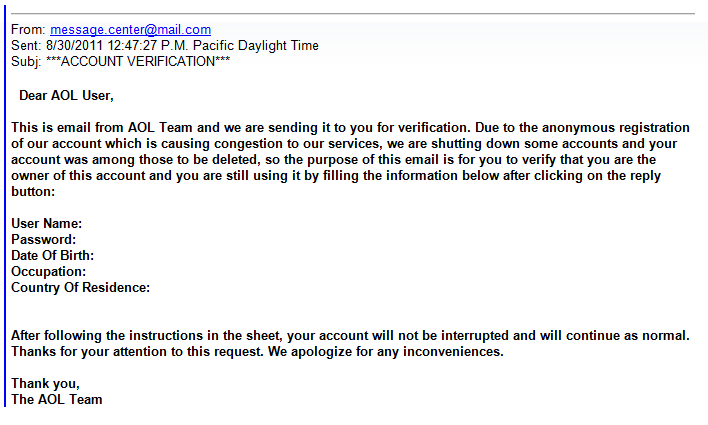
In the above example from “AOL” above, what characteristics do you see that it is a phishing email? Please post a note in the comments below.
This official-looking email includes bank logos and it appears to come from a bank email address. Yet if you carefully read the message in the email, grammatical and capitalization errors give a clue that this email did not come from a billion-dollar corporation. This email is attempting to get you to enter banking information into a form and opening an attachment to install a virus .
Some people think that nobody would be interested in reading their email, so their email password doesn’t need to be secure. However if a hacker accesses your email consider the following common occurrences:
A hacker can change your password and lock you out of your account.
A hacker can go to financial and shopping websites and have password reset requests sent to your email address. With access to your financially related websites in the hands of a bad guy, you could potentially lose thousands of dollars.
A hacker can copy your contact list and/or send emails on your behalf asking for money or send spam and malware that appears to come from you.
I suggest reading this more in-depth article by security researcher and former Washington Post reporter, Brian Krebs: The Value of a Hacked Email Account.
Adware is advertisement-supported software that is usually is bundled with other programs that are downloaded from the internet. For example you may download a free program from the internet, but in order for the website to make money they typically bundle the program with adware, browser toolbars and/or browser hijackers.
These Potentially Unwanted Programs (PUPs) will display advertisements, re-direct your internet search results and even change your browser home/start page. Adware should be removed as soon as possible because the ads often contain popups that report false computer error and update messages that lead to the installation of malware and other more severe computer problems. If your home page gets changed by adware, searching the internet through that page will often lead to untrustworthy and advertising supported search results.
Adware is sometimes avoidable if you carefully read each page as you are installing a program, and uncheck any optional adware boxes before clicking “Next”.
Contact Computer Techs today to have adware removed correctly and thoroughly by a professional.
For several years we’ve been warning people about tech support scams where someone claiming to be from Microsoft, your internet service provider or computer manufacturer calls to inform you that your computer is in danger and filled with trojan viruses or critical errors, or that your Windows license has expired.
In a later twist, shady companies began advertising on Google, Yahoo, Bing and other websites targeting search terms such as “HP tech support number” in hopes that vulnerable computer users would call them. After calling the number the representative would say that in order to help with the problem they would need to remote access to the computer. See examples in this article. Then just like the unsolicited calls from “Microsoft” above, you are lead to believe that your computer is infected.
Recently shady companies are now advertising on mobile search websites targeting search terms such as “Android tech support” or “iPhone tech support”. Similar to other tech support scams, after calling the number you are told to connect your smartphone to your computer then allow them remote access to your computer. You are then led to believe that trojan viruses on your computer are the cause of your smartphone troubles, and they offer to “fix” your computer.
Below are links to instructions for changing your password at most major email providers. Please review how to safely manage your passwords when creating a new password.
If you access email on your smart phone, tablet or email program on your computer, don’t forget to update the password that is stored on those device(s) with the new password you created in the steps above.
If you have AVG Anti-Virus Free Edition you may see a pop-up similar to shown at right. If you click “Learn More” it takes you to an AVG webpage with information about the Heartbleed bug that affects website servers, then recommends an upgraded paid version of AVG.
As with other AVG upgrade prompts we recommend that you decline the upgraded version – the free version is sufficient for most people.
The “Heartbleed bug” is a flaw in the OpenSSL encryption standard that is used by half a million websites which was uncovered on April 7. A majority of websites that require passwords for access use OpenSSL encryption to “scramble” the data transferred between your computer and the website’s server. OpenSSL has since been patched and millions of websites – many that you likely use – are being updated and new encryption certificates and keys are being issued.
So what does this all mean for the average computer user? Though it’s unclear at this time if the flaw was exploited on any of the websites you use, you should change your passwords. Here is a website that you can use to check to see if the websites that you use were impacted by the bug, and if it is now safe to change your password: Check to see if websites that you use were vulnerable to the Heartbleed bug: https://lastpass.com/heartbleed.
Now is a great time to implement a password system that makes your passwords secure, different for every site, yet easy to remember. See How to change your email password.
AVG AntiVirus releases program updates from time-to-time, and you will likely see pop-ups similar to those pictured below in the lower-right corner of your screen when an update is available. Whenever there’s an update that requires your interaction, AVG will try to entice you into upgrading to a paid version, add complimentary software or make other unnecessary changes. But if you follow the instructions below, you can continue with the free protection that is recommended for most home computer users at no charge. If updating AVG seems like too much trouble, see the bottom of this article for other options.
When you have a problem with your computer, printer or other technology device you may be tempted to search the internet to find a resolve for the problem. When you using Google, Bing, Yahoo, etc. you will usually get search results from multiple advertisers that if contacted the person on the phone will attempt to scare you into paying lots of money for made-up non-existent computer problems.
This is similar to the phony telemarketing calls from Microsoft scam, but since you are initiating the call you are lead to believe that you have contacted the official tech support for the company that you searched for. We frequently get calls from clients who have been the victim of such scams, after paying several hundreds of dollars and giving their credit card number to an untrustworthy person.
Click the screenshots below to see examples of search results I found recently. As you will see there are plenty of ads and phone numbers listed from companies that will likely attempt to swindle you.
The next time you have a tech support problem contact Computer Techs, a local trustworthy business who will give you honest advice and help you resolve your computer problems. We’ve been in business for over 10 years, and don’t charge clients for a quick phone call or email reply.
If you’ve been the victim of a tech support scam please contact us so that we can help you get your money back and check your computer for any malware or trojan software that the scammer may have left behind.
It not a matter of if your hard drive will fail – it’s when. The average life of a hard drive is 5 years. Your computer’s hard drive stores all of your documents, pictures, music and other important files that you keep on your computer. Are you prepared if tomorrow a virus locks you out of all of your files, your hard drive fails, or your data is stolen or damaged by fire or natural disaster? Now is the time to backup your important data – before disaster strikes.
I use 3 methods for data backup, and it is recommended that you backup your data similarly. I perform a daily computer image backup of my entire hard drive to an external hard drive attached to my computer. Secondly I use Carbonite to automatically backup my data twice daily via the internet to a secure data center in Utah. Lastly I sync/backup my Documents folder to DropBox or Google Drive, so that I can also easily access my frequently used files from multiple computers and devices.
Are you prepared if you lost access to your email account? If a hacker found out your password or security questions, they could delete all of your contacts or lock you out of your account forever. But if you setup 2-step verification for email access before a hacker does – you can easily regain access to your account. 2-step verification often involves allowing your email provider to send a text message to your phone if someone tries to access your email account, or if you forget your password. Click here to find out how to do it.



 Print This Article
 In a
In a 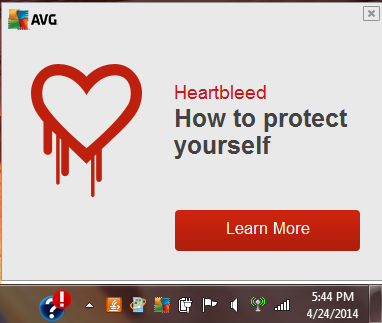 If you have AVG Anti-Virus Free Edition you may see a pop-up similar to shown at right. If you click “Learn More” it takes you to an

