Welcome to the Computer Techs Computer / Internet Tips & News blog. This purpose of this site is meant to provide a service to our valued customers, by keeping you informed with the latest news and tips related to your computer and the internet. Consider using the search box on the left side of the website to help you find a specific topic or article, or scroll through articles below to learn something new.


Get $25 Off your next service call for recommending Computer Techs

If you’re happy with our service, please consider recommending Computer Techs to a friend or relative. If we service their computer, you get $25 Off your next service call.

The details: Please have your friend or relative mention your name during the appointment, or after the appointment contact Mark Cobb with the name of the person that you recommended/referred. The referred person must be a new Computer Techs customer and not reside in the same household as the referrer.


How to: Selecting multiple items from a list

Filed under: Computing Tips - Oct 23 2007

Whether we are uploading pictures to a website or copying files from one folder to another, it’s often faster to select multiple items from a list rather than one-by-one.

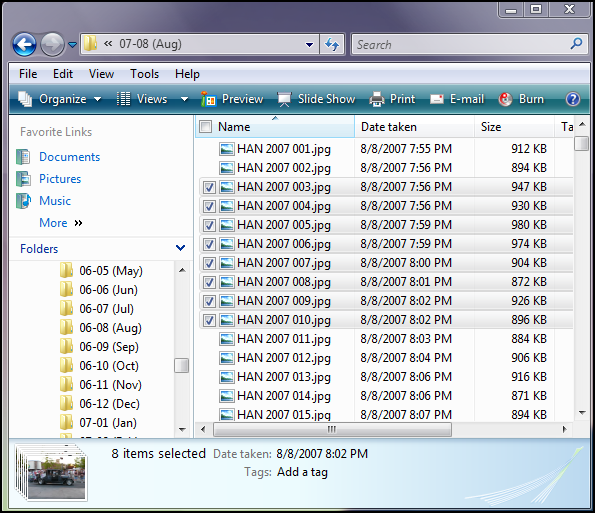
In the example below I have selected a range of picture files by clicking on the first item, then holding down “Shift” while clicking on the last item. I could then copy the selected pictures, move them, delete them, etc.

Shift+Click to select a range of items

(more…)

How to sort rows of information to organize your files and e-mail

Filed under: Computing Tips - Aug 31 2007

Occasionally a customer will tell me they can’t find their new e-mail amongst the rows of hundreds of e-mail messages. They say at some point their new messages start filling-in randomly in the middle of their list.

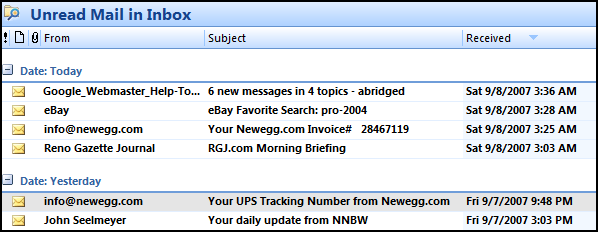
Usually what has happened is that they have inadvertently clicked on one of the column headers – “From”, “Subject”, or “Received”. Clicking on the row header will sort the rows (list of e-mail messages in this case) by that column. Clicking the same column header again will sort the items in reverse order (Z-A vs. A-Z, or date chronology).

Sorting email by Received date - newest first

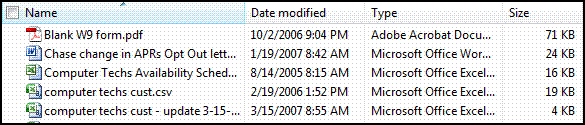
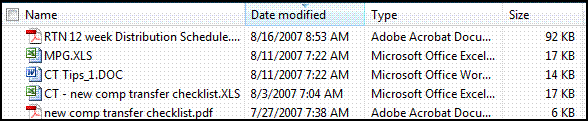
In the examples below, I am sorting files in “My Documents” folder. Note the triangle in the column header showing which column is being sorted, and a reverse sort order is indicated with an upside-down triangle.

Sorting Files by Name

Sorting files by Date Modified

If your files display as larger icons that don’t display the column headers, choose “Details” from the View Menu.

Print This Article Print This Article

Are you looking for a new computer WITHOUT Windows Vista?

Filed under: Archived,Computing Tips - Jul 30 2007

While most retail stores are only offering new computers loaded with Microsoft’s newest operating system – Windows Vista, Computer Techs still has access to new computers with Windows XP.

Businesses and corporations are hesitant to switch to Windows Vista since it is still too new, and it’s not compatible or 100% reliable with some consumer and business applications. Some hardware such as printers, scanners and cameras don’t work with Windows Vista. There are so many changes with Windows Vista, businesses don’t want to spend time and money to train people on the new operating system.

Similarly, people who are less computer savvy will find Windows Vista much different than Windows XP, or it’s predecessors Windows 98 or Windows ME.

As a service to Computer Techs’ clients, we are offering brand-new HP desktop computers loaded with Windows XP from our local wholesaler. The computers are configurable to your needs starting at approximately $575.

Get more out your iPod – try listening to a Podcast

Filed under: Computing Tips - Jul 27 2007

Podcasts are audio or video shows that can be downloaded from the internet. The shows cover a wide variety of specialized subjects. Podcasts cover daily news stories, comedy, or instructional. Many universities are offering classes or lectures in Podcast form. Categories include Technology, Cooking, Genealogy, languages and many more.

Despite the name, you do not need an iPod portable media player in order to listen to Podcasts. Podcasts can be played on many different portable players or on a computer.

Best of all most Podcasts are free. You can view a directory of Podcasts on your computer in the iTunes music player, or on a Podcast directory website such as Everyzing. Programs such as iTunes offer the convenience of automatically downloading new Podcast episodes from the internet as they become available.

You can view more information about a Podcast at Wikipedia.

Should I turn off my computer when I’m not using it?

Filed under: Computing Tips - Jul 27 2007

I often get asked this question. While you will often get different answers from different people – I leave my computer on most of the time. Every few days I will restart it, and occasionally I will turn it off overnight.

Consider this: The most wear and tear on your computer, car, etc. is when you start it up. The more frequently you turn off and on your computer, the more likely it is to fail. I like to use the analogy of a light bulb – when you turn on the light switch is usually the time the bulb burns out. Similar with your computer, it’s most likely to fail when you switch in ‘on’. The less you switch it ‘on’, the less likely it will fail.

Also similar to a car’s engine, excessive heating and cool down of a computer’s hard drive and other components will shorten the life of those parts.

Print This Article Print This Article

Watch out for fake e-mail greeting cards that install viruses

Filed under: Security - Jun 02 2007

Virus and Malware writers have become more creative in the ways they lure people to install their software. I’ve recently come across e-mails that lure the reader to view a “greeting card” with either an attachment or a link to a website that will install a virus on the computer. 

This leads us to another important e-mail safety tip – don’t click links in e-mails unless you know and trust the website that the link points to. For example virus writers and people that try to coax personal and financial information from people will design ‘phishing’ web sites that initially look like a legitimate web site.

(more…)

Computer manufacturer’s phone support is often a waste of time

Filed under: Tech Support - Jun 01 2007

Nearly every day I hear a story from a customer who had spent countless hours on the phone with their computer manufacturer’s tech support. Often times their problem is never fully resolved. Sometimes they are advised to “simply” insert their Recovery CD, but the phone support tech does not clearly explain that doing so will wipe-out every file and setting ever put on the computer, and restore the computer to the way it arrived from the factory.Customers often contact us after such mishaps to reconnect the internet, setup the e-mail, install the latest security patches, setup the printer and other items to get the computer back to the way things were before they called their manufacturer’s tech support.

To give them some credit however, phone support is difficult. A doctor won’t diagnose a medical problem over the phone. A mechanic won’t diagnose a problem with a car over the phone. Then why should someone reply on an accurate computer diagnosis over the phone? Computers and the software that they run are very complex. Diagnosing and fixing computer problems can only be done reliably by an on-site service technician.

The moral of this story is if you decide to call your computer manufacturer for help, if they advise you to run the Recovery CD, tell them you are going to get a second opinion – then call Computer Techs. 

I’d like to thank all Computer Techs customers for their continued patronage. Our calls for service continue to grow each month, and we have added additional techs to take-on the additional workload. However we still have room to grow. If you have a friend or family member that could use our services, please let them know about our service or forward them our newsletter. Word-of-mouth referrals are always appreciated.

We hope that the next time you need service on your computer or tutoring, you will contact us. You may contact our techs directly – please see our contact information page at www.CTreno.com/contact

Some Windows Updates causing problems

Filed under: Tech Support - Jun 01 2007

Windows updates are updates that Microsoft usually releases by automatically downloading and installing on your computer on the 2nd Tuesday of every month. These updates are programs or files that patch or fix flaws in Windows or other Microsoft products. The updates are usually classified as ‘critical’ because they patch or fix items related to the security of your computer. Hackers and malicious software writers will discover and try to take advantage of flaws in Microsoft products.

Occasionally when Microsoft releases a patch it will cause problems with other software programs on people’s computers. In April a critical update caused an incompatibility with certain sound device drivers causing an error message to appear every time people start their computer. Days after the initial Windows Update was released a patch was available for manual download from Microsoft’s website to fix the problem.

You may be tempted to not automatically download or install Windows Critical Updates due to these occasional problem. However this brings up a Catch-22 situation since not installing Windows Critical Updates can leave your computer vulnerable to security exploits.

If you suddenly experience problems with your computer after the 2nd Tuesday of the month, contact us to see if others are experiencing similar problems possibly due to a Windows Critical Update. We can advise you if an updated manual patch is available, or other actions to take.

AT&T Yahoo! changes to more secure e-mail – changes may be required

Filed under: Archived,Passwords,Tech Support - May 15 2007

We’ve had several questions recently from our customers who have AT&T Yahoo! DSL service, and have received an e-mail about an “Important Security Update” with their e-mail service.

In the e-mail, customers are advised that they if they use an e-mail client (such as Outlook or Outlook Express) they need to change some of their settings in order to continue receiving e-mail. They offer an automatic way of changing the settings via download of their “Self Support Tool”, or you can manually change the settings.

I recommend the manual method. As a service to our customers, I have posted step-by-step instructions with screen shots showing the new settings in Outlook Express.

(more…)

Quick Tips – Did you know?…

Filed under: Computing Tips - Mar 15 2007

• You don’t have to enter “http://” or “www.” as a suffix when you enter most website addresses in you browser. In your address bar you can just type ‘ctreno.com’ or ‘yahoo.com’ then the enter key.

« Previous PageNext Page »