Welcome to the Computer Techs Computer / Internet Tips & News blog. This purpose of this site is meant to provide a service to our valued customers, by keeping you informed with the latest news and tips related to your computer and the internet. Consider using the search box on the left side of the website to help you find a specific topic or article, or scroll through articles below to learn something new.


Get $25 Off your next service call for recommending Computer Techs

If you’re happy with our service, please consider recommending Computer Techs to a friend or relative. If we service their computer, you get $25 Off your next service call.

The details: Please have your friend or relative mention your name during the appointment, or after the appointment contact Mark Cobb with the name of the person that you recommended/referred. The referred person must be a new Computer Techs customer and not reside in the same household as the referrer.


What you should know about Facebook, Twitter and other social networking sites

Filed under: Computing Tips,Useful Websites - Jul 22 2009

Social networking websites such as MySpace, Facebook and Twitter have seen a tremendous gain in popularity in the past year. Even Oprah has begun to post on Twitter, as do all 3 local TV news stations. Whether or not you visit social networking websites, this article should help you learn more about the latest phenomenon.

In case you’re not familiar with these websites, social networking websites are a place that people can interact with others and upload pictures and video for other to see and comment about. They are a place where you can meet and interact with people who you know, and people that they know. Wikipedia defines a social networking service as a “service [which] focuses on building online communities of people who share interests and/or activities, or who are interested in exploring the interests and activities of others. Most social network services are web based and provide a variety of ways for users to interact, such as e-mail and instant messaging services.”

MySpace reached it’s peak in 2006 as primarily a place that teens and singles designed their own web “space” where they can post photos and music, and interact with other people. But recently people have started using the more popular website, Facebook.

Facebook is currently the largest worldwide online social network. Like MySpace it allows people to converse with friends and family members in an open or privacy restricted online community, and publish pictures, videos and links to other websites of interest. Facebook has lots of fun quizzes such as “What famous actor you look most like”, and share the results with your friends to comment on. It also has fan pages and group pages where you can follow businesses of interest, sports teams, and other organizations – and interact with people of similar interests. You can follow the Computer Techs Reno fan page. If you’ve got nothing better to do, Facebook can be fun and entertaining. Facebook can also be a timesink.

• My favorite social network is Twitter. Twitter is a unique social network that limits entries to 140 characters of text-only posts or “tweets”. To get by that limitation some people use link shortening services such as tinyurl.com or snipurl.com to post shorter links in tweets that direct readers to web pages that contain more information.

I primarily use Twitter to follow people and organizations in the technology industry that tweet technology related information. The limitation of 140-characters is helpful to me because it forces people to provide a short and to-the-point “headline” about what they are trying to communicate, and I can choose to follow a link (if provided) to get more information.

Some people tweet from their cell phones as a text message which is then transmitted to everybody that follows them – on the Twitter website, their cell phone or both. This is how information about the recent Iranian election riots first became known. I was among the first people to find out about Michael Jackson’s death because I was doing a live Twitter search for “Michael Jackson”, which updates public tweets every minute. Twitter is very useful if you want to follow news as it is happening.

People can make their tweets public where anyone can read them. One of my accounts is private, so that only the people that I selectively approve are allowed to view and follow my tweets. To make it interesting and useful, I only follow people who tweet interesting and informative things – and I do the same. I don’t follow people that frequently say something such as “I’m eating a ham sandwich”.

At the bottom of this article see the Twitter widget where you can see our recent Computer Techs Reno (CTreno) tweets, and follow us. Below that is the Computer Techs Reno Facebook fan box, showing our recent posts.

When joining a social network, be careful about adding friends to your network. Many services will offer to add friends if you give the website access to your email address book, then email an invitation to everybody in the list. I recommend adding friends one-by-one, and not giving a social network complete access to your entire address book.

For more information on the social networks of Facebook and Twitter, read PC World’s How to Avoid Facebook and Twitter Disasters

Print This Article Print This Article
How to pick and choose which Windows updates to install

Filed under: Computing Tips,Tech Support - Jul 21 2009

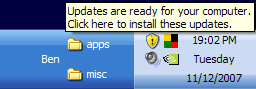
Windows updates that require acceptance of an End User License Agreement (EULA), will not automatically install. Instead the Windows Update shield will show in the system tray by the clock, and you have to accept the EULA before they are installed. Updates that don’t automatically install include updates for Internet Explorer and the Microsoft Windows Malicious Software Removal Tool.

In previous articles I’ve recommended against installing Internet Explorer 8 at this time. Below are some screen shots on how to not install it. Hover you cursor above each picture and instructions will pop-up.

systray

Click on the Windows Update shield

Select "Custom Install (Advanced)", then Next...

Select "Custom Install (Advanced)", then Next...

UNcheck the box next to any update(s) that you don't want installed

UNcheck the box next to any update(s) that you don't want installed

Choose if you want to hide the update from appearing again

Choose if you want to hide the update from appearing again

Should you upgrade to Windows 7?

Filed under: Archived,Computing Tips - Jul 20 2009

Windows 7Windows 7, Microsoft’s newest operating system will be released on October 22. If you purchase a new computer today, it will most likely come with Windows Vista installed. To keep PC sales strong until October, some stores and manufacturer’s are offering a free upgrade copy of Windows 7 after it’s released if you purchase a new PC before October.

A frequent question I am asked lately is if people should upgrade their current operating system (Windows XP or Windows Vista) to Windows 7. If your PC currently has Windows XP, then I do not recommend upgrading your current computer. However if you need a new computer, if you can wait for Windows 7 it would be a good choice rather than getting a new computer today with Windows Vista.

If you currently have a PC with Windows Vista, upgrading to Windows 7 may be a worthwhile upgrade. Once Windows 7 is available and we’ve had experience with the upgrade process, I will advise further.

Print This Article Print This Article

Craigslist offers free online classifieds for buying and selling goods, jobs and services

Filed under: Scams,Useful Websites - Jul 19 2009

Craigslist is a nationwide online classifieds website that some say has hurt the newspaper classifieds and contributed to the death of newspapers. Though nationwide, they have a local version of the website in major cities where local buyers and sellers can meet. The Reno website is at http://reno.craigslist.org

Craigslist offers free online classifieds for buying and selling goods, jobs and services. It’s a good place to make some money from some old, unwanted items or get a good deal on something you need. However just like any other place where you meet people that you do not know, you need to be careful about conducting business with strangers. If a transaction seems too good of a deal to be true – it probably is. Craigslist has honest people as well as scammers. See’s Craigslist’s advice on how to avoid scams here.

One of the items commonly sold on Craigslist is computers. If you have an old computer, Computer Techs can transfer any of your personal data to a new or existing computer. Then we can securely delete the data off your old computer, and in most cases restore the computer to it’s factory default state so that you can sell your old computer in working order.

Computer Techs technician Ron Seagraves sometimes buys used computers from ads found on Craigslist. Normally I don’t recommend purchasing used computers because new PCs are relatively inexpensive compared to a few years ago, and they come with a manufacturer’s warranty. However, if you need an inexpensive used computer under $200 or so, here are a few comments from Ron about his experience on Craigslist:

Craigslist is a site that is like a online garage sale. Many people in the Reno/Sparks community buy and sell items on Craigslist. I for one, do a lot of buying and selling on Craigslist and find that computers are no exception whether you are looking to upgrade to a newer system or want to buy a system for that student that lives in the house, that won’t break the bank.

If you have an old computer, you can try to either donate it or sell it on Craigslist . There are a lot of people in the Craigslist community who buy old computers. If you are upgrading to a new computer, sell your old one and put a little money back into your pocket.

If any of our customers have a question or are looking for a PC and find one on Craigslist but are unsure if it will suit your needs, the techs at Computer Techs can help you answer those questions. Once you purchase a computer, let the techs at Computer Techs examine the system to ensure that it is configured properly and that you have all security and productivity software installed, to ensure that you have a good computing experience with your new PC.

If you have any questions, please contact your tech at Computer Techs. We are always here to help you.

Print This Article Print This Article

Technology products that we recommend

Filed under: Computing Tips,Useful Websites - Jul 18 2009

We often are asked about technology products that we recommend. To help with your buying decisions we’ve recently added a page to our Tips website where you can view some of our most recommended technology products and computer software. You can read a short comment on why we recommend the item, and click on the item to view more information about it and even buy it from Amazon.com – all from our web page. If you’re interested in buying something else from Amazon.com, you can search for items directly from the Amazon.com search widget on our web page CTreno.com/tips/picks

You can also find a few of the items we recommend in a widget in the left column of the Computer/Internet Tips & News for Computer Techs clients website – www.CTreno.com/tips

I frequently purchase from Amazon.com since they have reasonable prices, detailed product descriptions, user reviews and good customer service. Check out our recommended products page or widget before your next technology purchase.

Print This Article Print This Article

Bing takes-on Google Search

Filed under: Computing Tips,Useful Websites - Jun 19 2009

Microsoft recently launched a new internet search website called “Bing”. From the Bing search pages at bing.com you can use some of the innovative features to get more information about your search results without having to leave the bing.com website.

For example, a web search features a text preview of the websites in the search results. A video search shows thumbnail-size previews of the videos. A shopping search shows product pictures, if applicable, plus prices and reviews. A maps search shows a 3D bird’s eye view of the location. Try some searches for yourself at bing.com.

Bing Search

Microsoft has also launched a free 411 information service called Bing 411 that competes with Google’s GOOG-411. Bing 411 is an alternative to the for-pay information services offered by telephone companies and cellular providers. Instead of calling 4-1-1, you can call 1-800-Bing-411 from a land line or cell phone to find local businesses or restaurants, movie times and weather. The computerized service uses voice recognition to detect what information is being requested by you, and will automatically connect your call if desired. Program Bing 411 into your phone’s speed dial and try it today.

You can get more information about Bing and Bing 411 at DiscoverBing.com

Print This Article Print This Article
Send and receive faxes without a fax machine

Filed under: Computing Tips,Useful Websites - Jun 19 2009

If you need a simple and affordable way to occasionally receive or send a fax document without a fax machine, I recommend an affordable service from maxemail.com. For the past 5 years I’ve been using the “Maxemail Lite” service plan to receive faxes for just $24 per year.

How it works: People who send me a fax simply send it to my own dedicated 815-prefix telephone number. I receive the fax as an email attachment, which I can print or just view on my computer screen. I can also send faxes by emailing an attachment to Maxemail, which they then convert and send to the recipient’s fax machine. Sending faxes on my subscribed plan is just 5-10¢ per page.

With the fax-via-email service I save time and money since I don’t need a fax machine, nor the hassles of having to be at home to turn on the fax machine every time I want to receive a fax, or the need of a dedicated phone line for a fax machine. I also save ink and paper because I don’t print unwanted faxes.

For more information about the Maxemail Lite service plan visit their website.

Print This Article Print This Article

[Old Article] Don’t buy a new PC yet – Windows 7 coming soon

Filed under: Archived,Computing Tips - Jun 04 2009

Windows 7If you’ve been thinking about purchasing a new computer this year, you may want to hold off until at least June 26 or late October, depending on your needs. According to this source, after June 26 if you purchase a new PC with Windows Vista, you will be eligible to receive a free Windows 7 upgrade DVD after it’s released later this year.

Windows 7 is Microsoft’s newest operating system which will be available October 22, pre-loaded on most new computers. I’ve been testing Windows 7 Beta and Release Candidate since the beginning of this year, and I’ve been very impressed with the improved speed, design and functionality of the new operating system. If you’re familiar with Windows Vista which was released in early 2007, Windows 7 looks and operates similar to Windows Vista but with many improvements.

There’s too much to tell here about Windows 7, so below are some links to find out more information directly from Microsoft’s websites:

See how Windows 7 features will make using a PC faster and easier

Windows 7 Release Candidate videos

When it comes time to purchasing a new PC, Computer Techs can help you decide which computer is best for you and configure and setup your new PC in your home. Read our advice about how to select a new PC and get the best deal.

Print This Article Print This Article

Watch out for “Scareware” or “Malware”

Filed under: Passwords,Scams,Security - May 27 2009

Recently we have been warning clients about scams where fake anti-virus programs have been causing widespread problems. Some of these programs can get onto your computer by simply going to an infected website either directly, through a link, or via a link in an e-mail.

Computer Techs has begun referring to these programs as “Scareware” and “Malware”. We call it Scareware because the  pop-up or program “scares” you into believing that what it is telling you is true, and that you must react quickly to cure the perceived problem. For example a pop-up might inform you that you have registry errors, or hundreds of viruses and password-stealing trojans on your computer. Malicious software is referred to as Malware because it does malicious and damaging things to your computer without your knowledge or consent.

Anti-virus software companies are having a difficult time keeping up with the malware because the malware is constantly changing its patterns, and it’s a cat-and-mouse game of the anti-virus trying to keep up with the new viruses. We recommend reading the advise in our previous articles about what to do at the first sign of Scareware in order to help prevent it from automatically installing malware on your computer.

If you have signs of Scareware or Malware it is important to give us a call as soon as possible to keep any malware that may have been installed from automatically downloading more malware and possibly irreversibly damaging your computer.

Print This Article Print This Article

Problems with Internet Explorer 8

Filed under: Archived,Computing Tips - May 27 2009

Internet Explorer 8 was released as a manual Windows Update about a month ago, and some customers have experienced various issues after installing the update. If you have not already installed it, I recommend waiting until some of the issues get fixed. If you have already installed it and are experiencing issues, you can uninstall it via the Add/Remove Programs Control Panel (Windows XP) or Programs and Features Control Panel (Windows Vista), which will also revert Internet Explorer back to version 7. You can selectively choose not to install the manual update by following these directions.

Some issues I’ve heard of or experienced include:

• Cannot install ActiveX controls that are required to use features on some websites

• When logged into financial institution web site, some time you may need to log-in again when clicking a link that opens a new window

• Conflicts with RoboForm form-filling software

• Incompatibilities with some toolbars

• Clicking an internet web page shortcut placed on the desktop will not open Internet Explorer

Print This Article Print This Article
« Previous PageNext Page »