Category: Scams
Updated September 2018:
Antivirus and Antimalware program tests have shown than no software detects and/or disinfects 100% of all viruses and malware. Thousands of new viruses are unleashed each day, and antivirus programs cannot keep up with the new viruses fast enough. With millions of different viruses in the wild, your best defense against getting infected is practicing safe computing habits.
Below are a few tips to help keep you safe on the internet – copied from our FAQ page:
(more…)
Email spammers and scammers are now breaking into email accounts and collecting known “active” email addresses from people’s address books.
Known ways that spammers are hacking accounts include:
• Guessing a weak password.
• Guessing a known security question so that the password can be changed/reset.
• Sending an email from what looks like the email provider asking to reply to the email and give the email password.*
Once spammers get a hold of email addresses they send spam messages promoting bargain pharmaceutical drugs, software, etc. They forge their email address to appear to come from one of the people in the hacked address book since people are more likely to open an email that appears to come from someone they know.
Another recent scam is to send individual e-mails to everybody in the address book asking for money. The scam usually includes something like “I am on vacation in Europe and lost my passport and cell phone. Please wire me some money so that I can get back home.” Since the e-mail address is forged to look like coming from a known friend, the recipient may believe the e-mail and send money to a scammer.
* Below is an actual e-mail that looks like it’s from Yahoo, in which scammers have been getting Yahoo e-mail account information.

If you get an e-mail from what appears to be someone you know that contains advertisements or asking for money, it’s likely their e-mail address is being forged. Just delete the e-mail. If contacts are telling you that you are sending spam, immediately change your e-mail account password and password retrieval security questions, just in case your account has been hacked.
See Creating secure and memorable passwords.
 Print This Article Print This Article
Now that nearly every U.S. household can access the internet, it’s easy for scammers to infect millions of computers by tricking computer users to install viruses and malware. Below are 3 of the most common methods to watch out for which scammers use to install software without your consent which can render a computer useless until a ransom is paid, use the computer as a spambot or capture keystrokes and login information.
1. The phony e-mail attachment: You may get an e-mail that looks like it’s from UPS, Facebook, the IRS or Microsoft prompting you to open the attachment with the “.zip” extension to view “the package information”, “your new password” or “a critical update”. What happens when the attachment is opened is a fake anti-virus program will be installed on your computer and render it nearly useless until you pay to register the program. Even paying for the program does not get rid of it. It’s a scam to get you to pay money for a problem you never had. We call it “ransonware” or “scareware”.
2. The phony e-mail with a link: You may get an e-mail that looks like it’s from your bank, PayPal, Amazon.com or e-mail provider without an attachment. There is a link in the e-mail that looks like it will direct you to the senders website to “verify information” or view the “details of your order”. When the link is clicked normally you would be directed to a fake yet realistic looking website that would prompt you to enter financial and/or personal information that would later be used for malicious purposes. Sometimes the link is directed to a website that would pop-up a fake anti-virus program as described above.
3. The fake website: you may click on a link in Facebook, forum or search result and then you see a pop-up for a legitimate-looking anti-virus program that looks like it’s scanning your computer and finding multiple threats. It’s a scam to eventually get you to purchase a program for a problem with your computer that didn’t exist until after you installed the fake program.
As mentioned in previous articles if you see a pop-up from an unknown program that is warning you about multiple security problems with your computer, you should immediately turn off or restart your computer. Do not click the “X” on the upper right corner of the window, nor anywhere on the pop-up. Doing so will likely install the unwanted program. If the pop-up is gone after you restart your computer, your computer is likely ok. If you continue to see warnings or strange behavior, contact Computer Techs so that we can check out your computer and remove any malware or viruses.
If you get a pop-up window from an unknown program telling you that there are multiple problems with your computer, immediately turn off or restart your computer and see if the program returns after your computer is back on. Do not try to close the window or click anything except for Start > Turn Off Computer. Other buttons that say “No”, “Cancel” and even the red “X” in the upper right corner of the box are often used to trick you into downloading or installing a malicious program without your consent.
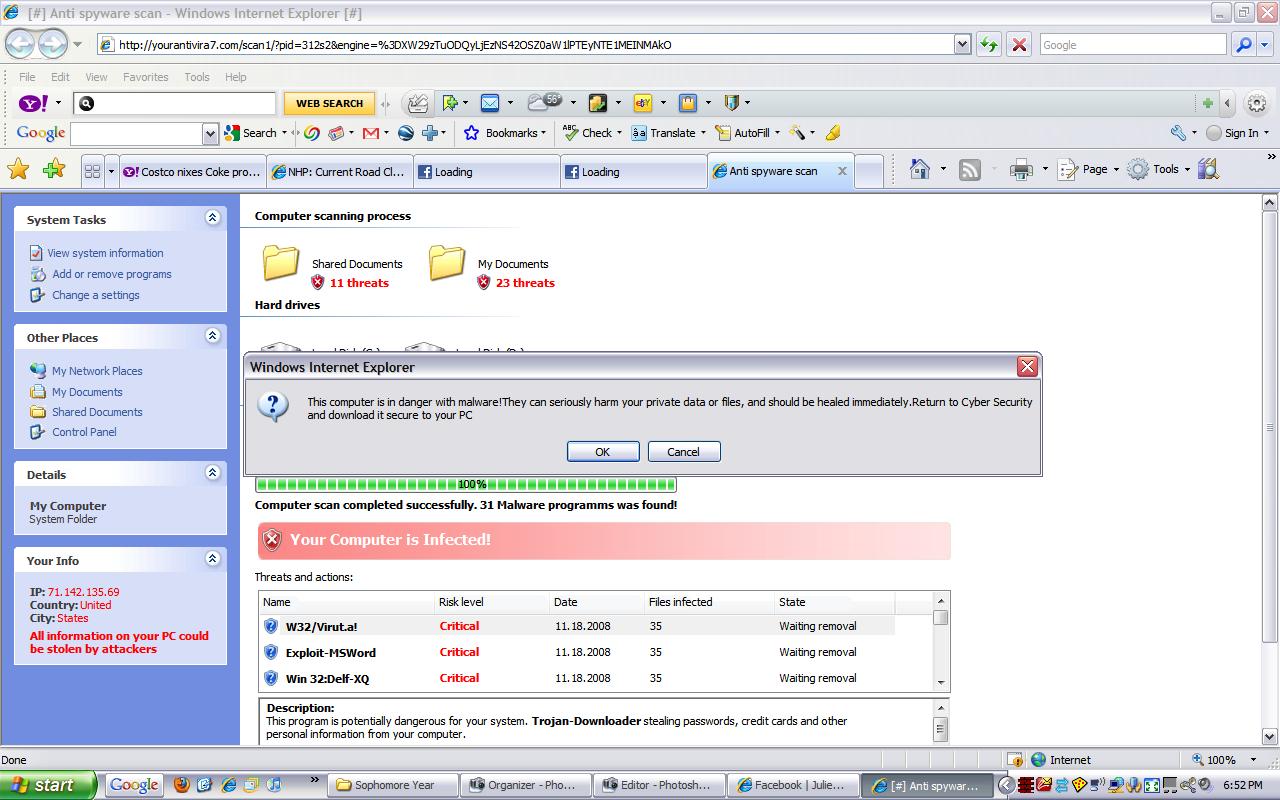
Above is a screen shot from a typical security warning that you may see. Logical thinking should tell you that what you are seeing is likely a scam:
• One minute your computer is fine. You click on a web link and all of a sudden you have multiple (perhaps hundreds) of problems or infections. You’ve been re-directed to a malicious web site. SCAM!
• You know that the anti-virus program on your computer is AVG, Norton, etc. A program that you’ve never heard of before tells you that you’ve got multiple problems. SCAM!
• A program that you’ve never heard of before is offering a free scan ( a come-on), or perhaps is asking your to register or buy a license key. SCAM!
Though I’ve been warning of these scams for years in our newsletter and website, we get calls daily from clients who got tricked into clicking on the fake warnings and inadvertently installing malicious software that will constantly pop-up and eventually ask you for your credit card to pay for the rogue software.
To become familiar with real vs. fake anti-virus warnings see the screen shots in the article How to recognize real vs. fake anti-virus warnings.
Print This Article
If you get a pop-up window from an unknown program telling you that there are multiple problems with your computer, immediately turn off or restart your computer and see if the program returns after your computer is back on. Other buttons that say “No” or “Cancel” and even the red “X” in the upper right corner of the box are often are used to trick you into downloading or installing a malicious program without your consent.
Craigslist is a nationwide online classifieds website that some say has hurt the newspaper classifieds and contributed to the death of newspapers. Though nationwide, they have a local version of the website in major cities where local buyers and sellers can meet. The Reno website is at http://reno.craigslist.org
Craigslist offers free online classifieds for buying and selling goods, jobs and services. It’s a good place to make some money from some old, unwanted items or get a good deal on something you need. However just like any other place where you meet people that you do not know, you need to be careful about conducting business with strangers. If a transaction seems too good of a deal to be true – it probably is. Craigslist has honest people as well as scammers. See’s Craigslist’s advice on how to avoid scams here.
One of the items commonly sold on Craigslist is computers. If you have an old computer, Computer Techs can transfer any of your personal data to a new or existing computer. Then we can securely delete the data off your old computer, and in most cases restore the computer to it’s factory default state so that you can sell your old computer in working order.
Computer Techs technician Ron Seagraves sometimes buys used computers from ads found on Craigslist. Normally I don’t recommend purchasing used computers because new PCs are relatively inexpensive compared to a few years ago, and they come with a manufacturer’s warranty. However, if you need an inexpensive used computer under $200 or so, here are a few comments from Ron about his experience on Craigslist:
Craigslist is a site that is like a online garage sale. Many people in the Reno/Sparks community buy and sell items on Craigslist. I for one, do a lot of buying and selling on Craigslist and find that computers are no exception whether you are looking to upgrade to a newer system or want to buy a system for that student that lives in the house, that won’t break the bank.
If you have an old computer, you can try to either donate it or sell it on Craigslist . There are a lot of people in the Craigslist community who buy old computers. If you are upgrading to a new computer, sell your old one and put a little money back into your pocket.
If any of our customers have a question or are looking for a PC and find one on Craigslist but are unsure if it will suit your needs, the techs at Computer Techs can help you answer those questions. Once you purchase a computer, let the techs at Computer Techs examine the system to ensure that it is configured properly and that you have all security and productivity software installed, to ensure that you have a good computing experience with your new PC.
If you have any questions, please contact your tech at Computer Techs. We are always here to help you.
Print This Article
Recently we have been warning clients about scams where fake anti-virus programs have been causing widespread problems. Some of these programs can get onto your computer by simply going to an infected website either directly, through a link, or via a link in an e-mail.
Computer Techs has begun referring to these programs as “Scareware” and “Malware”. We call it Scareware because the pop-up or program “scares” you into believing that what it is telling you is true, and that you must react quickly to cure the perceived problem. For example a pop-up might inform you that you have registry errors, or hundreds of viruses and password-stealing trojans on your computer. Malicious software is referred to as Malware because it does malicious and damaging things to your computer without your knowledge or consent.
Anti-virus software companies are having a difficult time keeping up with the malware because the malware is constantly changing its patterns, and it’s a cat-and-mouse game of the anti-virus trying to keep up with the new viruses. We recommend reading the advise in our previous articles about what to do at the first sign of Scareware in order to help prevent it from automatically installing malware on your computer.
If you have signs of Scareware or Malware it is important to give us a call as soon as possible to keep any malware that may have been installed from automatically downloading more malware and possibly irreversibly damaging your computer.
Print This Article
Updated March 28, 2009 (added link to more online articles):
Fake anti-virus programs have been appearing on an ever-increasing number of computers in the past year, tricking people into believing they have a large number of viruses and privacy threats on their computer and recommending that people buy specific software to fix the problems.
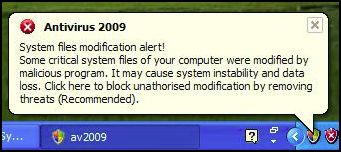
One common fake program, Antivirus 2009, pops up a realistic-looking Windows Security Center window that recommends the purchase of a license for the program. It also presents a balloon pop-up from the system tray (by the clock on the bottom right of the screen) that further alarms people, and leads them to believe that purchasing the program will remove the immediate threats to their computer’s security. The fact is that the program is a scam which shows false scan results and fake realistic-looking windows in an attempt to trick people into buying their program.
Screen shots at the bottom of this article show signs that you may have this fake program installed on your computer. Other signs that you may have a fake removal program on your computer include grammatical errors in the text of alerts that pop up, multiple alert methods, and urgent messages that suggest the immediate purchase/registration of a program that you’ve never heard of before.
What to do if you get warning messages from a program that you have never installed: To avoid or reduce the damage caused by these scammers, I suggest that if you get a pop-up window from an unknown program telling you that there are problems with your computer, you immediately turn off or restart your computer and see if the program returns after your computer is back on. Previous methods of clicking the red “X” on the upper-right corner of the box have been ineffective at keeping this malware from installing.
Many legitimate Anti-Virus programs do not yet completely remove fake anti-virus programs. Computer Techs often uses manual removal methods to completely remove the bogus program and the traces it leaves behind.
Fake anti-virus programs are not a new problem. Over 2 years ago I wrote about similar programs. There is even a website that until May 2007 attempted to provide current updates on the names and techniques of all the rogue anti-spyware programs.
More Articles: PC World writes “Fake infection warnings can be real trouble“. The Register has written an in-depth article on how this scam gets spread and entices people to install it.
(more…)
One of the most controversial programs being sold for computers is regsitry cleaning software. While there are legitimate registry cleaners, many of them advertised on the internet are scams that provide false information to lure people into buying their product – similar to the fake anti-virus programs that are causing widespread problems with people’s computers.
In a recent review of legitimate registry cleaners in PC World Magazine, the author advises that the programs require careful analysis of the results that they display. More time is required to back-up the registry before making any changes, and paying attention to any computer glitches that may occur after cleaning the registry. It’s a time-consuming process which may or may not speed-up your computer.
From my experience, registry cleaners provide little or no performance benefit. The results are often difficult to interpret, and what action to take based on the results is confusing. Cleaning the registry can cause more harm than good. Bottom line, avoid registry cleaning programs and let the professionals at Computer Techs make a recommendation based on a thorough analysis of your PC. When tuning-up our computer we rarely use a registry cleaner, we use several different cleaning tools and manual setting adjustments depending on the job to improve the speed of your computer. Occasionally backing up your data and re-installing Windows, your programs and your data is the best way to bring your computer back to the way it performed when you first got it.
Print This Article
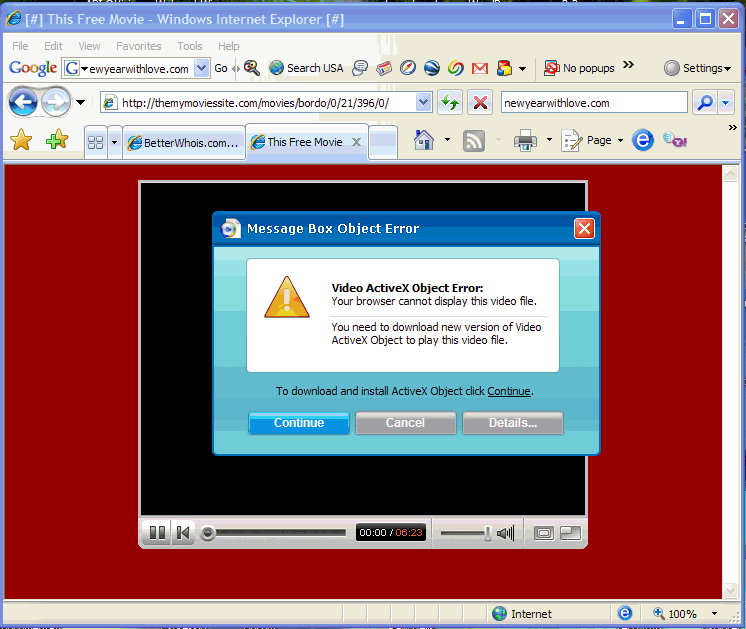
The popularity of the video sharing website YouTube.com has prompted scammers to register website domains with letters similar to y-o-u-t-u-b-e in hopes that people will mis-type or not notice that a link on a web page or e-mail is not pointing to the real website.
I’ve seen dozens of computers infected with spyware and viruses after the owner went to a fake YouTube website and was prompted to install “Video ActiveX Control” in order to view the video. See the screenshot below of an example of downloads you should avoid. The real YouTube uses Adobe Flash Video Player, something that is already installed on most computers. You can check to make sure you have the latest Flash Video Player – currently at version 9,0,115,0 – on this Adobe web site.
Remember to follow safe browsing habits and do not download anything from websites you do not know or trust, and to look carefully at the website address.
There are thousands of web sites on the internet that claim that their registry cleaner or anti-virus/anti-spyware program will solve your computer problems. Many of these programs are “snake oil” or scams that often install additional unwanted spyware or trojan viruses and cause other problems to your computer. SpywareWarrior.com has compiled a comprehensive list of some of the fake programs. Many of the programs give false warnings of problems with your computer and entice you to scan your computer for “free”. After the scan the programs often present a detailed list of more problems and offer to fix the problems for “only $39”.
In summary, these programs are scams – and there were likely no problems with your computer before you came across the website that produced the pop-up advertisement. I first documented this problem in March 2006.
Below are examples of an indication that you may already have installed one of the scams…

The official-looking alert below is shown in the taskbar notification area, and is an indication that one of the fake programs has already been installed on your computer.

If you see notices similar to the examples above, I recommend contacting Computer Techs to have us remove all traces of the fake program, and any additional spyware that they usually install. While some anti-spyware or anti-virus programs may detect the fake programs, many will not remove all of the remnants that the programs leave behind. We’ll also provide you with education on how to avoid installing these programs in the first place.
« Previous Page — Next Page »
|