Category: Computing Tips
There are lots of ways to save money on computer expenses including free software, reducing the amount of printer ink you use, and inexpensive internet service.
Below I summarize several new and previously published tips from our customer blog that you can implement immediately to start potentially saving hundreds of dollars each year.
• Free Microsoft Office alternative office suite If the Office trial that came with your computer ran out or you don’t want to spend hundreds of dollars to upgrade to a new version, a free alternative includes a word processor and programs for creating spreadsheets, presentations and drawings.
• Free Anti-Virus / Anti-Spyware protection There’s no need to keep paying companies like Norton, McAfee or Trend Micro an annual fee to inform you about virus threats which may be on your computer. There are free programs which work just as well (if not better).
• Cheaper internet If you are paying over $20 per month for high-speed or dial-up internet service, there are cheaper alternatives. AT&T currently offers high-speed internet service as low as $10/month for new customers or $20/month for existing customers. Those prices are for 768 Kbps service – most casual internet and e-mail users would not notice a difference if downgrading from a faster, more expensive plan.
• Save money on printer ink Most of the time there’s no need to use color or print at a high-quality setting when printing a web page or e-mail. Follow my tips on how to save ink and money.
• Get free on-line backup Mozy charges just $4.95/month for a service which automatically backs up an unlimited number of files on your computer to a secure online storage area. If you need less than 2 GB of files backed-up they offer a free service plan.
• Get the best deal on a new computer If you are in need of a new computer, I tell you what extra features and add-ons you can avoid so that you can get the best deal.
• The best bang-for-the-buck computer upgrade Adding RAM (Random Access Memory aka “Memory”) is the usually the best bang-for-the-buck hardware upgrade to make your computer faster.
 Print This Article Print This Article
Microsoft has released the latest version of Windows Live Mail (a program similar to Outlook Express) that adds spam/junk e-mail filtering and easy photo sharing capabilities.

Windows Live Mail offers customizable junk (spam) e-mail filtering including an option to only allow mail from a Safe Senders List into your Inbox.

The Photo E-mail composition window lets you easily insert pictures from your computer, which get converted to thumbnail-size and you can add captions and borders. If you sign-up for a free Windows Live account, or have a current live.com, hotmail.com or msn.com account, your full-size photos will be automatically uploaded to a private online storage area and held for 30 days. The advantage of the online storage of the full-size photos is that it lets you send more photos in an e-mail which are small file size, without getting close to the 10MB-per-email size limit imposed by many e-mail service providers.
For example I recently sent an email with approximately 20 pictures. If I had sent the e-mail with another program without down-sizing the pictures, the combined size of all the pictures would have been over 10 MB. However sending the pictures using Windows Live Mail, the thumbnail-size pictures embedded in the e-mail only added up to 200KB. When I sent the e-mail Windows Live Mail it automatically uploaded the 10MB+ full-size photos online. The e-mail recipients can click on the pictures in the e-mail to be taken to a web page with full-size pictures which they can view as a slide show or download any or all pictures to their computer.

Windows Live Mail also has a handy search feature for email messages or contacts that narrows down the the list of search results as you type. A calendar lets you organize your schedule and syncronize it to an online calendar.
You can get Windows Live Mail and other Windows Live software from the Windows Live Downloads website. If you would like Computer Techs to install Windows Live Mail and show you how to use it, please contact us.
Print This Article
Copying files to a CD can be accomplished in a few steps using the CD burning software included with Windows. Before starting, make sure the file(s) or folder(s) you want to copy will fit onto the space available on a CD. To do this, right-click on the file(s) or folder(s) and select Properties. The size will be shown in Megabytes (MB). The amount CD’s can hold is up to 650 MB. If you use Windows Vista you can burn to a single-layer DVD as well, which holds up to 4500 MB.
1. Select the file(s) or folder(s) you want to copy, right-click on one of them and select Send To > (your CD/DVD writable drive).
2. A balloon will pop-up in the system tray.

3. Click the balloon, and you will see a window displaying files ready to be written to the CD. Click on the link “Write these files to CD” under CD Writing Tasks to launch the CD Writing Wizard.

4. Follow the simple steps shown by the CD Writing Wizard, including naming your CD and inserting a blank CD-R disk if you haven’t already done so.
Finally, put your CD in a safe place. To backup all of your data with greater ease and safekeeping, read our automatic backup tips.
Print This Article
One of the most controversial programs being sold for computers is regsitry cleaning software. While there are legitimate registry cleaners, many of them advertised on the internet are scams that provide false information to lure people into buying their product – similar to the fake anti-virus programs that are causing widespread problems with people’s computers.
In a recent review of legitimate registry cleaners in PC World Magazine, the author advises that the programs require careful analysis of the results that they display. More time is required to back-up the registry before making any changes, and paying attention to any computer glitches that may occur after cleaning the registry. It’s a time-consuming process which may or may not speed-up your computer.
From my experience, registry cleaners provide little or no performance benefit. The results are often difficult to interpret, and what action to take based on the results is confusing. Cleaning the registry can cause more harm than good. Bottom line, avoid registry cleaning programs and let the professionals at Computer Techs make a recommendation based on a thorough analysis of your PC. When tuning-up our computer we rarely use a registry cleaner, we use several different cleaning tools and manual setting adjustments depending on the job to improve the speed of your computer. Occasionally backing up your data and re-installing Windows, your programs and your data is the best way to bring your computer back to the way it performed when you first got it.
Print This Article
When you send an email message to more than one person, if you do not address the recipients as Blind Carbon Copy (BCC), you may be contributing to the spam email problem.
A common way spam and viruses are spread is via email. If you send a message to multiple email addresses without using Blind Carbon Copy, all the email recipients’ addresses are visible to all other recipients – and to any virus or spambot that may be on any of the recipients’ computers. Many viruses and spambots gather e-mail addresses from infected computers to redistribute viruses and spam.
Letting email addresses be visible to others is also a privacy concern – there may be people in your address book that don’t want their email address spread around for others to see.
You may be unknowingly spreading false information
Many urban legends are spread via email – often in the form of chain letters that urge you to forward the message to everyone that you know. Useful websites that help separate factual from fictional email chain letters are Snopes.com, TruthOrFiction.com and Hoax-Slayer.com.
Interestingly, I’ve received emails with a subject “Advice from Snopes.com” – but Snopes denies that it’s something they’ve distributed. Even if the email says that the information was verified on Snopes.com, do yourself and your email recipients a favor by investigating it on Snopes first.
Print This Article
AT&T recently announced the availability of their enhanced TV service in the Reno/Sparks area. Before the announcement AT&T only offered TV service via DISH Network Satellite TV. Now AT&T has it’s own TV system – U-verse TV – which gets to your home via the same copper telephone wires that carry telephone and internet.
AT&T is offering their U-verse TV as part of U-verse services, which is a bundle of communication services that includes TV, telephone and internet at a package price – similar to what Charter has been offering for a few years in the Reno area.
See http://uverse.att.com for more information and to check availability in your area. At this time I can’t get the U-verse service, but it’s available about 10 houses away from me.
When Microsoft released Office 2007 last year, they also changed the default file format that Word, Excel and Powerpoint files are saved. Office 2007 files add an “x” to the end of the file extension. For example Word documents used to have the file extension of .doc however the new Word 2007 files are saved with the extension .docx by default. Excel files now end with .xlsx, and Powerpoint files end with .pptx.
If you have a pre-2007 version of Word, Excel or Powerpoint you will need to download and install the Microsoft Office Compatibility Pack for Word, Excel, and PowerPoint 2007 File Formats to convert and view the new file type.
(more…)
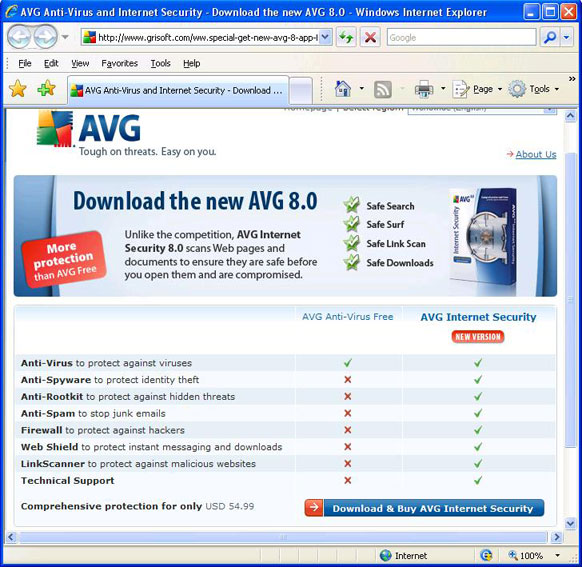
 Advertisements in AVG Anti-Virus Free Edition have recently began promoting their new AVG Internet Security 8.0. In my opinion most people don’t need the additional features that AVG Internet Security 8.0 provides since most of the additional features are redundant or free from other sources. I list specific examples below, as well as a screen shot of the AVG website which compares the free and paid versions. Advertisements in AVG Anti-Virus Free Edition have recently began promoting their new AVG Internet Security 8.0. In my opinion most people don’t need the additional features that AVG Internet Security 8.0 provides since most of the additional features are redundant or free from other sources. I list specific examples below, as well as a screen shot of the AVG website which compares the free and paid versions.
- AVG Anti-Spyware and Anti-Rootkit are available separately in a free versions.
- Anti-Spam is provided by many e-mail services, and the AVG program doesn’t filter spam in web mail.
- Windows already has a built-in incoming firewall.
- There are similar free products to “Web Shield” and “LinkScanner”. This type of protection is as only good as their list of known bad websites which are increasing faster than the protection programs can keep up. Your best protection against bad websites is behavioral by practicing safe internet surfing habits.
At this time for most people I recommend just keeping AVG Anti-Virus 7.5 Free Edition. Eventually they may offer 8.0 in a free version, and I will post updated advice if and when the time comes.
Microsoft has released Service Pack 1 for Windows Vista, which includes all previously released security and reliability updates plus some additional enhancements. I installed Service Pack 1 last week and noticed that Vista seems much faster, though I no longer had sound after installing the update. After I re-installed the sound drivers, I was able to hear my sound again. If you have a computer with Windows Vista, I recommend installing the update when prompted. Be prepared to spend about 1 hour updating to Service Pack 1.
If you currently have a computer with Windows XP is it time to upgrade or switch to Vista? If you purchased a computer in the past few years, I do not recommend upgrading to Windows Vista. There are no compelling reasons to upgrade. If you have an older computer and want to get a newer, faster computer – you have an option of getting a new computer with XP or Vista, but just for a little while longer. After June 30, Windows XP will no longer be available from Microsoft. Currently a few manufacturer’s such as HP and Dell still offer a few new computer models with Windows XP, but they are only available by special order – you won’t find XP in “big box” stores.
If you are computer savvy and don’t mind change, I now think Windows Vista is not a bad choice when purchasing a new computer in most cases. If you rely upon pre-2007 peripherals such as scanners or printers, or older programs, you could have some compatibility issues or they may just not work. Be prepared to buy new hardware and/or software as well. But if most of what you do is internet, e-mail and word processing, you shouldn’t have any troubles with Vista after the initial “getting used to it” phase.
If you’re considering the purchase of a new computer, we can help you choose which version of Windows would be better considering your needs. We can also acquire a new computer for you, set it up, and transfer the files from your old computer.
I’ve heard from quite a few people lately that have noticed an increase in spam in the past month. I’ve been getting it too. Read my recently updated page of spam prevention tips to help you decide if it’s time to get a better spam filter, change your e-mail address, or just wait until the latest spam filtering catches up with the latest spamming techniques in the cat-and-mouse game of spammers vs. anti-spam. You’ll also learn what you can do to help prevent the spreading of spam.
« Previous Page — Next Page »
|


