Category: Security

How to protect your internet accounts from being hacked

Filed under: Computing Tips,Passwords,Security - May 26 2012

We get a lot of calls where the person’s account has been hacked. The hacker has sent spam email to their contacts, and often copies their contact list for the purpose of sending future emails and forging their name and email address. Others have had emails sent to their contacts asking for money because they are in distress in a foreign country while on vacation. After their account got hacked, people usually ask us how it happened. Typical methods that hackers are able to access email accounts include….

1. Guessing an insecure password to access your account. Examples of insecure passwords include common names, names of a pet, words listed in a dictionary, or using the same password for different websites.

2. Guessing the answer to your account security question(s), then resetting the password so that the account can be accessed.

3. Insecure web site databases are being hacked and the usernames and passwords are being used to log into email and other accounts. For example, here’s a common scenario that could happen to you:

You discover xyzrecipes.com and register for an account so that you can access their exclusive recipes that are only available to registered users. They require an email address for a username, and ask you to create a password to access their site. To make it easy to remember, you simply use the same password that you use to access your email – since most people wouldn’t care if somebody got access to your xyzrecipes.com account.

However, a few weeks later a hacker breaks into the xyzrecipes.com user database and copies all the email addresses and passwords. The hacker then tries to access your email account using the same password that you used to register at xyzrecipes.com. If it’s the same password, they now have access to your email account, make a copy of your contact list and send spam messages to your contacts that look like they’re coming from you. Worse yet they can read all of your previous emails, learn about the people you correspond with and financial transactions that you make, and/or change your password – locking you out of your email account.

4. If you click on a link in an email which leads to a malicious website, the website can capture your email login credentials.

5. Sending an official-looking email asking for email login credentials. (See sample below)


What you should do if you’ve been hacked, and tips to prevent being hacked.

If your email account was hacked, immediately change your password. (If your email address is the master account for AT&T DSL service, see note below*) Below are a few things you can do to help prevent your email account(s) from being hacked.

1. Use a password system/pattern so that you have a unique memorable password for each web site. I recommend putting part of the letters of the website in the password. (See creating secure memorable passwords.)

2. If the account has a password reset question (or account security question – ASQ), make sure that the answer to your question is something that a hacker would not know or easily guess.

3. Learn how to recognize emails that “phish” for your information.

4. Secure your email account with 2-step verification.

* Note: If your email address is the master account for an AT&T DSL account, after changing your email password you need to call AT&T DSL at 877-722-3755 and have them give you your network password to program into your DSL modem or router. Otherwise you could lose your connection to the internet.


Print This Article Print This Article

How to create a password system that’s secure and memorable

Filed under: Computing Tips,Passwords,Security - May 21 2012

Updated September 2020:

To help prevent unauthorized access to personal information, many websites require a password that consists of six or more characters, numbers and letters, and uppercase and lowercase letters. Creating a password that meets the requirements and being something you can remember doesn’t have to be a challenge.

I have created a password system that you can use or modify to create memorable passwords. The most important part of the system is that a different password is created for each website.

If you currently use the same password for different websites, if the password or website gets compromised, hackers could access your data on all other websites that you use. That would be bad.

The system divides a password into 3 memorable parts that create a secure 10-character password when put together:

Part 1 – First 3 letters of my name [Mar]
Part 2 – First 3 letters of the website – (Yahoo would be [Yah], Google would be [Goo], Amazon would be [Ama], etc.)
Part 3 – 4-digit month & year of my birthdate [0468]

To summarize, my Yahoo password created under this system would be MarYah0468 – created by putting the 3 parts together. Notice that I use uppercase letters as the first letter of each part for added security.

If you’re using a website or service that had a data breach and you’ve been told to change your password, you could just change the 3rd part to reflect the current month & year:

Part 3 – 4-digit month & year that the password was changed [0916]

To summarize, my new Yahoo password changed due to a data breach in September 2016 would be MarYah0916

If you keep a written or typed password list, for added security you could write the name of the website and date, while using an underscore “_” or dash “-” for characters of the password that you’ve memorized without showing the entire password on paper and revealing your password to someone that you may not want to read your password list. For example, my written Yahoo password would be M – – Y – – 0 9 1 6

You should use your own variation of this system. Here’s some suggestions:

• Capitalize the MIDDLE or LAST letter in each part

Use the first 3 letters of your MIDDLE or LAST name, the name of a loved-one – or your initials.

• For Part 2 remove the vowels from the website or service – Yahoo would be Ah, Google would be Ggl, Amazon would be Mzn.

• For Part 2 use the letter or character one key to the right on the keyboard – Yahoo would be Usj, Google would be Hpp, Amazon would be S,s

• For Part 3 of the system, use a 4-digit number from your graduation year, childhood phone number or street number, or any other number that you’ll remember for life. For added security you could use a different number based on the type of website – for example you could use part of your SS# for financial websites, a street number for shopping websites, your graduation year for social networking websites, and birth month+year for everything else.

• Add a special character such as [! ? # *] at the beginning, end or memorable location in the system. Alternatively you could use special characters instead of numbers by holding the shift-key when typing numbers – thus 0468 would be )$^*

• “Pad” or add something somewhere in your password that you don’t write down – such as putting a childhood phone number or zip code at the end of every password.

You may also want to visit the following website for ideas on creating a memorable password system: http://www.f-secure.com/weblog/archives/00001691.html

Also read how to safely manage your passwords.

Print This Article Print This Article

Emails that phish for your email credentials on the rise: What you need to do to stay safe

Filed under: Computing Tips,Passwords,Security - Nov 26 2011

In the past month we’ve received an unusually high number of calls from clients that have had their email accounts hacked. The hackers have accessed their email password either by simply asking for it via a phishing email, or hacking into other insecure web site databases then trying to use the same password to access their email account. After accessing their email account the hackers have done many of the following steps:

• Changed their password and account security questions to permanently lock them out of their email account

• Sent emails to their contacts saying that they are traveling in a foreign country and are in desperate need of money

• Deleted all of their saved email

• Deleted everybody from their contacts/address book

• Changed their email options so that all email forwards to the hackers email address, and all replies are sent to the hacker

• Made a copy of their address book and are continually sending out spam email to their contacts that looks like they are originating from the person whose email account was hacked

Many web sites (including financial institutions) have an option to reset your password by sending an email to your address-on-file. If a hacker has access to your email, they can easily receive the email, reset and change your banking or other password and steal money or purchase merchandise under your name.

Below is what you need to do now to help prevent your email account from being hacked in just 3 easy steps…

• See how to recognize emails that “phish” for your private information

How to help prevent your internet accounts from being hacked

Create a secure and memorable password system

Sadly, the clients that called for after-the-fact help could have prevented their email accounts from being hacked in the first place by taking a few minutes each month to read our monthly newsletter. Information about hacking and steps to avoid it has been mentioned in it each month for years.


Print This Article Print This Article

[Old Article] New AVG Anti-Virus 2012 available – How to install new free version

Filed under: Archived,Computing Tips,Security - Sep 28 2011

AVG has released the 2012 version of their free anti-virus and other paid versions. Installing the update should be quick and easy if you following the instructions below.

When a pop-up from the system tray appears – as shown below (near the clock on the bottom right corner of your screen), click “Update Now”.


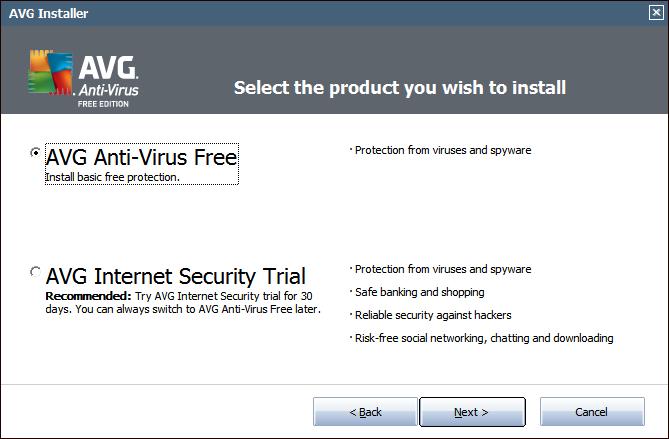
By default “Full protection” is selected. For the free/basic version which we recommend, select “Basic protection” (as shown below) then click “Next”.


That’s it! The installation should continue, then prompt you to restart your computer when finished.

After installation if you get a prompt to scan your computer for errors or problems with the AVG PC Analyzer component, I recommend avoiding doing the scan. It looks for registry errors and junk files among other things – which are harmless – then prompts you to purchase the add-on if you want items fixed.

If you have problems with the automatic installer, you can manually download the new free version directly from AVG’s website:
http://free.avg.com/us-en/download.prd-afh

If you need assistance downloading and installing the new AVG Anti-Virus, please call or e-mail us. We’ll be happy to take care of it for you, and give your computer a check-up/tune-up while we are there.

Print This Article Print This Article

How to tell if your e-mail was hacked, and what you can do about it

Filed under: Passwords,Security - Jan 24 2011

A friend reports receiving a weird message from your e-mail account, a message you didn’t write. This could mean your account was hacked, or it could have a completely different cause. The PCMag.com article below explains how to tell if your e-mail was hacked, and what you can do about it. Did you get hacked, or was it someone else? Also mentioned is how you can recover from e-mail hacking and how to stay safe by preventing hacking in the first place by using good passwords.

Click here to read the article.

A message about the December 2010 AVG Anti-Virus update problem

Filed under: Archived,Computing Tips,Security - Dec 27 2010

On the evening of December 1 I received 4 phone calls within about 30 minutes with each caller having the same problem following a prompt by AVG Anti-Virus to restart the computer. The problem was that their computer would not start up. A check of social media networks and other news sources indicated it was a widespread problem across the world. Since a large majority of Computer Techs clients use the free version of AVG for their anti-virus detection, I decided to notify our 1300+ clients via the Computer Techs monthly newsletter subscription list, and on our social networking news feeds at FaceBook.com/ComputerTechs and Twitter.com/CTreno.

Over time it was discovered that the newly released program update was incompatible with 64-bit versions of Windows Vista and Windows 7, causing Windows not to start. Once the problem update was discovered it was quickly pulled from AVG download servers to prevent problems on more computers.

AVG is not the only anti-virus vendor that has temporarily released an update that caused problems with computers. McAfee, Trend Micro and BitDefender have all had bad updates in the past few years. Microsoft has even released updates as part of their monthly automatic critical updates that have caused problems for millions of computer users.

We still recommend AVG anti-virus because it’s easy to use, provides good virus detection and the availability of a free version which is enough for most computers. If you are upset like we are about AVG’s new “PC Optimizer” and other add-ons that pop-up and eventually ask for payment, another free alternative is Microsoft Security Essentials. Remember that an anti-virus program is your second line of defense for computer security. Your first line of defense is practicing safe computing habits.

Print This Article Print This Article
Don’t rely only on Antivirus software to keep your computer virus-free

Filed under: Computing Tips,Scams,Security - Dec 27 2010

Updated September 2018:

Antivirus and Antimalware program tests have shown than no software detects and/or disinfects 100% of all viruses and malware. Thousands of new viruses are unleashed each day, and antivirus programs cannot keep up with the new viruses fast enough. With millions of different viruses in the wild, your best defense against getting infected is practicing safe computing habits.

Below are a few tips to help keep you safe on the internet – copied from our FAQ page:

(more…)

[Old Article] AVG Anti-Virus Free 2011 released – How to get free update

Filed under: Archived,Computing Tips,Security - Dec 07 2010

Updated 12/7/10:

AVG Anti-Virus Free 2011 was released September 28th. A review by CNET indicates that it’s better than previous versions. I’ve noticed that AVG Identity Protection and Anti-Rootkit components are now included in the free version. This should improve detection over the previous version.

If you currently have AVG 9.0 or earlier you will likely see a prompt to update similar to the window shown below. I suggest selecting “Update your free protection” or “Basic Update”. The not-free Internet Security program adds redundant and unnecessary extra protection that usually slows down computers and presents confusing firewall prompts.

After visiting the AVG website and downloading the free version…

…if prompted to install the AVG/Yahoo! Browser Toolbar and change your default search engine, un-check the 2 boxes (the bottom then the top), then proceed with installing AVG without the toolbar (as shown below).

I recommend ignoring the PC Analyzer component. It looks for registry errors and junk files among other things – which are harmless – then prompts you to buy the add-on if you want items fixed.

You can also download the new free version directly from AVG’s website:
http://free.avg.com/us-en/download.prd-afh

If you need assistance downloading and installing the new AVG Anti-Virus, please call or e-mail us. We’ll be happy to take care of it for you, and give your computer a check-up/tune-up while we are there.

Print This Article Print This Article

Get a PC check-up/tune-up before holiday shopping on the web

Filed under: Security,Tech Support - Oct 21 2010

Before going online to shop and engage in financial transactions on your computer this holiday season, we recommend a check-up/tune-up so that you can be assured that your computer is secure and as speedy as can be.

Many of the viruses and malware these days are being distributed through infected web sites. If your computer doesn’t have the latest security patches for Adobe Reader, Java and other web-browsing plug-ins, viruses and malware can easily install on your computer without any action on your part. Some of the malware is undetectable with normal anti-virus software and require special tools to detect and remove.

If your computer is slow, hidden viruses and malware may be the culprit. Unnecessary programs running in the background and toolbars often slow-down the computer and internet browsing. Often times more memory (RAM) can be added to dramatically speed-up performance.

Give us a call today so we can schedule a security check-up and tune-up before you spend time shopping on the internet this holiday season.

Print This Article Print This Article
What is the best anti-virus? New test results released.

Filed under: Security,Tech Support - Sep 15 2010

Updated September 2010:

We often recommend AVG Anti-Virus because it has good virus detection without slowing down your computer like other security suites do. However, AVG nor any other Anti-Virus software catches 100% of threats. The best offense is a good defense – read Don’t rely only on Anti-Virus software to keep your computer virus-free.

Sometime I compare protection for your car with protection for your PC. If you have all the best protection for your car (seat belt, multiple air bags, etc.) and then drive your car off a cliff, you’ll likely be killed. Similarly if you have all the best security protection on your PC and then install a malicious program on your computer, you’re likely to get your computer infected.

Historic tests of anti-virus products reveal that a majority of the programs detect 70-90% of known viruses (reactive detection), and 50-70% of unknown viruses (proactive detection). Since no program has a 100% detection rate, practice good defensive computing behavior to help prevent viruses.

AV-comparatives also conducts regular tests of anti-virus products. Their test results can be found here.

Print This Article Print This Article

« Previous PageNext Page »