Category: Security

AVG Anti-Virus Free Edition promoting upgrade to their not-free product which most people don’t need

Filed under: Archived,Computing Tips,Security - Nov 17 2007

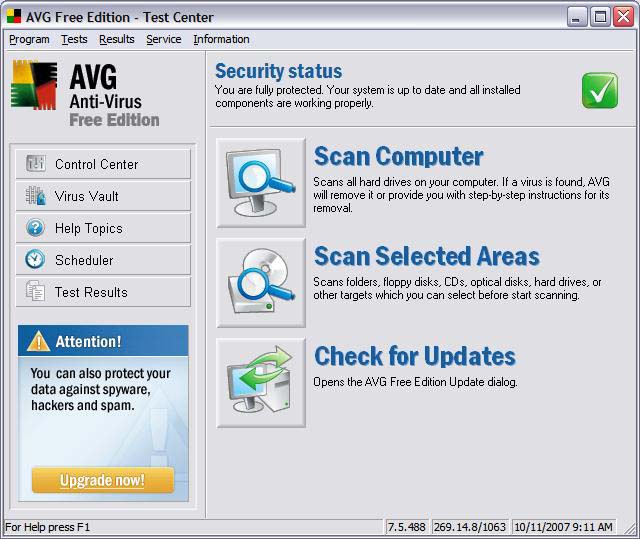
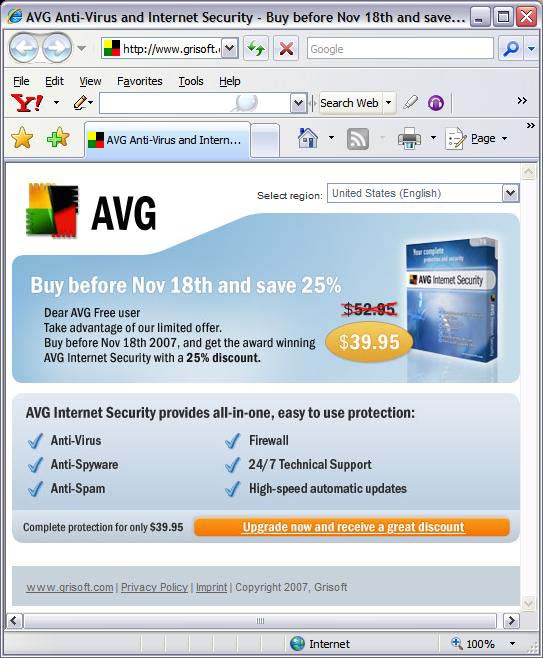
AVG Anti-Virus Free Edition has recently been aggressively promoting an upgrade to their not-free Internet Security software. In my opinion, this is an upgrade which most people don’t need.

The upgraded software adds Anti-Spyware, Anti-Spam and Firewall protection – most of which is redundant protection that most users already have. While their Anti-Spyware product is good, it is also available as a free separate download. Most email providers offer spam protection/filtering, and AVG’s Anti-Spam product only works in an e-mail client such as Outlook Express. Windows XP and Windows Vista already have an inbound firewall, and hardware routers offer inbound firewall protection. AVG’s outbound firewall is similar to other outbound firewalls that pop-up sometimes confusing questions when it detects outbound internet access.

In summary, I don’t recommend upgrading to their Internet Security product.

AVG Test Center upgrade advertisement

AVG upgrade website

Watch out for fake e-mail greeting cards that install viruses

Filed under: Security - Jun 02 2007

Virus and Malware writers have become more creative in the ways they lure people to install their software. I’ve recently come across e-mails that lure the reader to view a “greeting card” with either an attachment or a link to a website that will install a virus on the computer. 

This leads us to another important e-mail safety tip – don’t click links in e-mails unless you know and trust the website that the link points to. For example virus writers and people that try to coax personal and financial information from people will design ‘phishing’ web sites that initially look like a legitimate web site.

(more…)

[Old Article] Reminder: New Version of AVG Anti-Virus – Mandatory Upgrade

Filed under: Archived,Security,Tech Support - Mar 15 2007

Grisoft has released version 7.5 of their AVG Anti-Virus program. If you have an old version of AVG Anti-Virus on your computer you will be presented with a window box notifying your old version was discontinued in February. You will be given several choices for upgrading to the new version, including an option to download and upgrade to the latest free version (see bottom of box).

The “click here” link in the box will take you to a AVG 7.5 product page – including an option on the bottom “To download new AVG Anti-Virus Free Edition 7.5, please click here.”

You can also upgrade to the new free version from within the AVG Test Center or Control Center by going to the “Information” menu > “I Need Help – Online Services”, then click on the “Download” link, “Installation Files & Documentation”, then download the new version and follow the upgrade instructions.

If you should decide to buy one of their paid products, as always I do not recommend “Security Suites” which combine extra (and often redundant) software which can slow down your computer and cause more problems than they claim to fix. An Anti-Virus and Anti-Spyware program is sufficient for most computer users.

Anti-Virus companies automatically charging your credit card

Filed under: Computing Tips,Security - Mar 15 2007

Beware of Anti-Virus companies that automatically renew your annual subscription even though you may not have their software installed on your computer. Companies such as Symantec and McAfee have begun to automatically charge customer’s credit cards every year for renewal subscription fees. See this PC World article. When giving your credit card information online, read carefully and thoroughly to see if the company will be automatically charging your card in the future.

[Old Article] New Version of AVG Anti-Virus – Mandatory Upgrade

Filed under: Archived,Security,Tech Support - Nov 15 2006

Grisoft has released version 7.5 of their AVG Anti-Virus program. If you have AVG Anti-Virus on your computer you may be presented with a window box notifying your old version will be discontinued in January 2007. You will be given several choices for upgrading to the new version, including an option to download and upgrade to the latest free version (see bottom of box).

The “click here” link in the box will take you to a AVG 7.5 product page – including an option on the bottom “To download new AVG Anti-Virus Free Edition 7.5, please click here.”

You can also upgrade to the new free version from within the AVG Test Center or Control Center by going to the “Information” menu > “I Need Help – Online Services”, then click on the “Download” link, “Installation Files & Documentation”, then download the new version and follow the upgrade instructions.

If you should decide to buy one of their paid products, as always I do not recommend “Security Suites” which combine extra (and often redundant) software which can slow down your computer and cause more problems than they claim to fix. An Anti-Virus and Anti-Spyware program is sufficient for most computer users.

The trouble with MySpace.com…

Filed under: Archived,Computing Tips,Security - May 15 2006

The social networking website MySpace.com is very popular with teenagers and singles. The site allows anyone to create their own web page or ‘space’ that can be customized with pictures, music and colorful graphics. People will often publish information about their interests an hobbies. Friends or strangers can post messages and pictures on anybody else’s MySpace page.
 
The problem with MySpace is that for the most part it is uncensored and some users have posted pictures that could be considered pornographic, and comments that are crude or violent. Some have found it as a way to express feelings or opinions that they wouldn’t necessarily say if they weren’t hidden behind a keyboard. I feel that many parents would be shocked by the stuff that some of their teenagers post on their MySpace page.
 
As a parent of a pre-teenager, I recommend to all parents of teenagers who use MySpace that they view their son or daughter’s MySpace profile and talk to them about what is appropriate and what is not. 
 
Alternatively, there is commercial computer monitoring software that can monitor and/or disallow access to programs or websites – or allow access on a timed basis. I have researched and tested a few computer parental control programs and have found my favorite to be a program called
Cyber Patrol.
 
If you need help limiting or monitoring your children’s internet usage, ask us if Cyber Patrol would be good software for your computer. If so, we would be happy to install it for you and configure the powerful features to your needs, and train you on how to get the most use from the program.

Misleading websites making money from internet users: What you need to know

Filed under: Computing Tips,Security - May 15 2006

Misleading marketing companies and individuals are making money off internet users by publishing websites in attempt to make money from people that accidentally misspell web addresses, click links on search websites and charge for “free” software.

Misspelled web addresses – Be careful when you type in a website into the address bar of your internet browser. Clever people have published websites that take advantage of misspellings or transposed letters. Some of these websites look similar to the correctly-spelled websites that people intend to type. Others are search pages that get paid for every link that is clicked on the site. Such sites may even attempt to make it your browser’s ‘Home Page’.

I came across an example of this when I recently tried to renew my driver’s license at www.dmvMv.com instead of www.dmvNv.com The bogus site brought up a search site not run by the State of Nevada Dept. of Motor Vehicles – but it looked official. The publishers of look-alike websites make money from every link that is clicked on.

Links on reputable search sites may not always take you to a trustworthy website – When you use your favorite search engine (Google, Yahoo, MSN, etc.) to help you research unfamiliar websites don’t always trust the first website you come across. A few months ago if you searched for “Firefox” (a popular free web browser alternative to Internet Explorer), on Google a top-listed link would take you to a website named freedownloadhq.com. That site will let you download and install Firefox for free, but require you to pay if you want to use it. Many people have paid this company for the Firefox browser, and were unaware that the same program is free from the publishers at www.firefox.com

Free coupons – There are websites that let you print out manufacturer coupons for free or deeply discounted items at the supermarket. However the coupons are counterfeit. If the deal sounds too good to be true – it probably is. The publishers of these websites often make money by selling your e-mail address or selling you the coupon at a discount. For more information visit www.cents-off.com


New ways to “phish” for your private information

Filed under: Computing Tips,Passwords,Security - Mar 15 2006

According to Wikipedia “phishing” is a form of social engineering, characterized by attempts to fraudulently acquire sensitive information, such as passwords and credit card details, by masquerading as a trustworthy person or business in an apparently official electronic communication, such as an email or an instant message. The term phishing arises from the use of increasingly sophisticated lures to “fish” for users’ financial information and passwords. (Click on the Wikipedia link at the beginning of this paragraph for more information including detailed examples claiming to come from eBay or PayPal). I’ve recently come across a new Phishing scheme that causes a window to pop-up on a computer claiming to be from AOL, and requesting information you should never give out on the internet – such as ATM PIN number. Luckily the customer did the right thing by not filling out the form, called AOL and confirmed that this is a phishing scheme. You can see the official-looking window below.

Watch out for new hoaxes that can put “Ransomware” on your computer

Filed under: Computing Tips,Security - Mar 15 2006

You’ve probably heard of Adware and Spyware. There’s a new word for programs that deceptive advertisers coax people into downloading from the internet – “Ransomware”.

Here’s a scenario…

You go to a website and an official-looking pop-up window appears on your screen telling you that you have viruses and spyware on your computer. The pop-up may give you a “yes” or “no” choice to scan your computer – though clicking “no” has the same affect as the “yes” button. After a program is downloaded, it appears to scan your computer and shows you that you have several viruses or spyware. It offers to clean the junk off your computer for “only $29.99”. If you don’t buy the program you get more pop-up ads and (fake) Windows alerts. The only way to stop the pop-ups and scare tactics is to buy their software. They are holding your computer at ransom until you buy their software. Many people give in.

Here’s what really happening…You initially visited a website that gets paid every time a visitor clicks on one of the ads. These ads are made by clever and deceptive marketing companies that will do anything to coax you into clicking on the ad. Once you click the ad you’ve allowed the marketers to download anything onto your computer. Soon afterwards a program claims that you have a number of viruses or spyware programs on your computer. The names it shows are usually names of real threats – but they’re not really on your computer, it’s just another gimmick into making you think you need to purchase their program.

After seeing dozens of these programs on people’s computers in most cases I’ve discovered what people have really bought was a hoax, and an “Anti-Virus” program that slows down your computer and doesn’t protect you from any real viruses or spyware.These fake anti-virus/anti-spyware companies are trying to sell you something. The internet makes it easy for them to make money off of millions of naive computer users. Remember they are trying to sell you something, don’t believe everything you see on the internet or from a pop-up window.If you get a pop-up window that you are unsure whether it’s an official Windows message, or just an advertisement you can check by visiting a trustworthy website. Close all browser windows, go to Start > Run and type in www.ctreno.com. That should open your default internet browser to Computer Tech’s home page. There is nothing on the Computer Techs home page that should generate a pop-up window or advertisement.

« Previous Page