

Address Bar vs. Search Bar vs. Search Box – Which to use?
Web browsers have an address bar, and some also have search bars. Some web pages have search boxes. I am often asked which bar or box should be used to get to where you want on the internet.
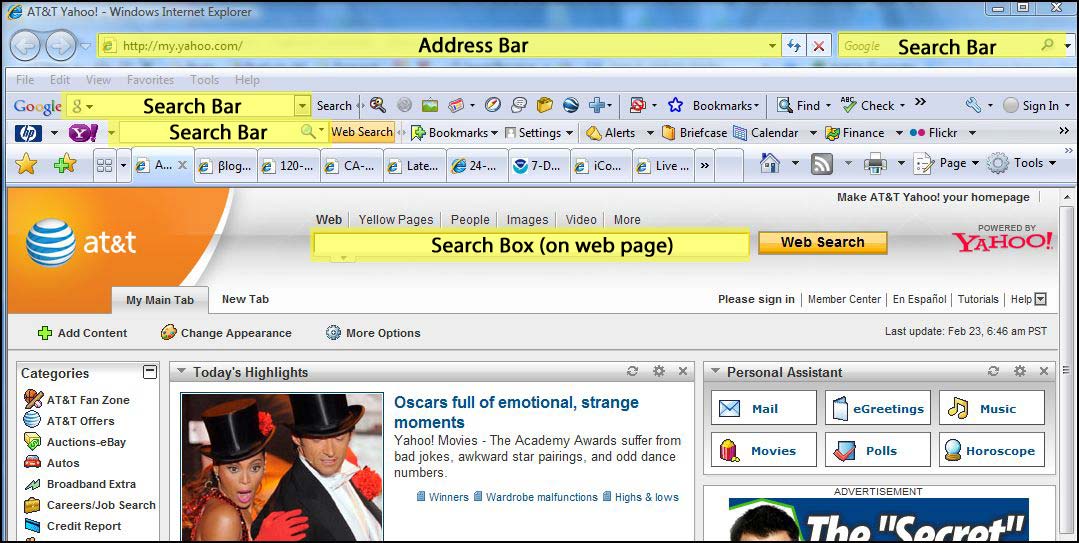
The address bar is used if you know the actual address of a web site or web page (eg. http://www.yahoo.com)
Tip: Did you know you don’t have to enter the leading “http://” or “www.” to get to most web sites?
The search bar is used if your are searching for something on the internet (eg. “computer repair”, “recipes”, “grammy winners”, etc.) Using the search bar will take you to search results from internet search providers such as Google or Yahoo.
A search box on a web page is similar to the search bar, but it will give you search results based on the internet search provider that is used by the web page. For example if you are on the AT&T home page (http://att.yahoo.com), anything you type in the search box on the web page will bring up internet search results provided by Yahoo. Charter’s home page brings up Google search results, as does AOL.com.
Another way to compare the different methods of accessing websites is like comparing it to dialing a phone number on your telephone. For example if you want to call the local Papa John’s Pizza and you know the phone number, you just dial the phone number (which is like entering a specific website into the address bar). If you don’t know the phone number, you dial 411/information (which is like using the search bar), which would give you results for all Papa John’s Pizzas from which you could then choose the one you want.
 Print This Article