

What to do if you see a warning pop-up from an unfamiliar program
If you get a pop-up window from an unknown program telling you that there are multiple problems with your computer, immediately turn off or restart your computer and see if the program returns after your computer is back on. Do not try to close the window or click anything except for Start > Turn Off Computer. Other buttons that say “No”, “Cancel” and even the red “X” in the upper right corner of the box are often used to trick you into downloading or installing a malicious program without your consent.
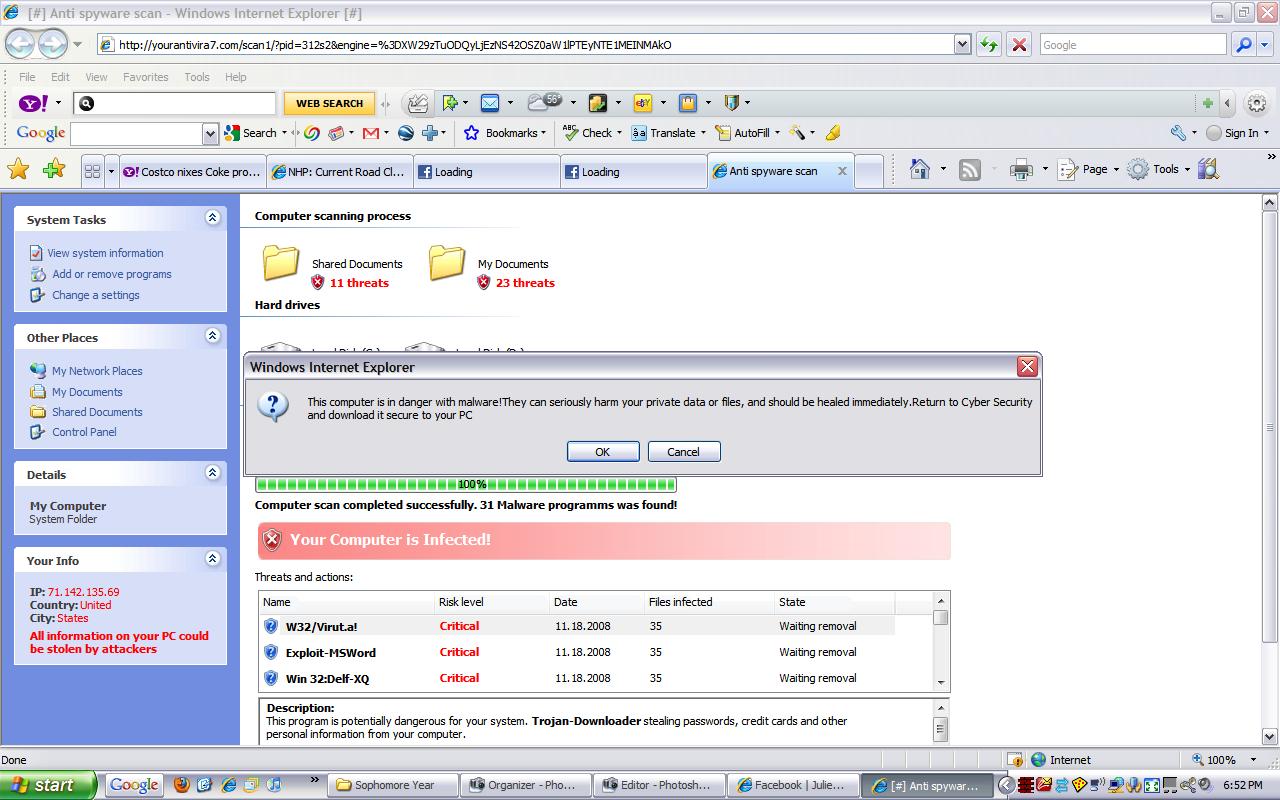
Above is a screen shot from a typical security warning that you may see. Logical thinking should tell you that what you are seeing is likely a scam:
• One minute your computer is fine. You click on a web link and all of a sudden you have multiple (perhaps hundreds) of problems or infections. You’ve been re-directed to a malicious web site. SCAM!
• You know that the anti-virus program on your computer is AVG, Norton, etc. A program that you’ve never heard of before tells you that you’ve got multiple problems. SCAM!
• A program that you’ve never heard of before is offering a free scan ( a come-on), or perhaps is asking your to register or buy a license key. SCAM!
Though I’ve been warning of these scams for years in our newsletter and website, we get calls daily from clients who got tricked into clicking on the fake warnings and inadvertently installing malicious software that will constantly pop-up and eventually ask you for your credit card to pay for the rogue software.
To become familiar with real vs. fake anti-virus warnings see the screen shots in the article How to recognize real vs. fake anti-virus warnings.
 Print This Article